I spent a full Saturday afternoon setting up what I thought was a gorgeous Pinterest profile — beautiful boards, a nice profile photo, a neat little bio. Then I waited. And waited. Three weeks later, I had eleven followers, zero traffic to my blog, and the creeping suspicion I was doing everything wrong.
Sound familiar? Pinterest looks simple on the surface — you pin pretty pictures, people find them, magic happens. Except that’s not really how it works, especially now. I’ve been using Pinterest seriously for over two years, and the difference between the “just pinning stuff” phase and actually understanding the platform is enormous. So here’s everything I wish someone had told me before I wasted three months getting nowhere.
Pinterest is a Search Engine, Not a Social Network
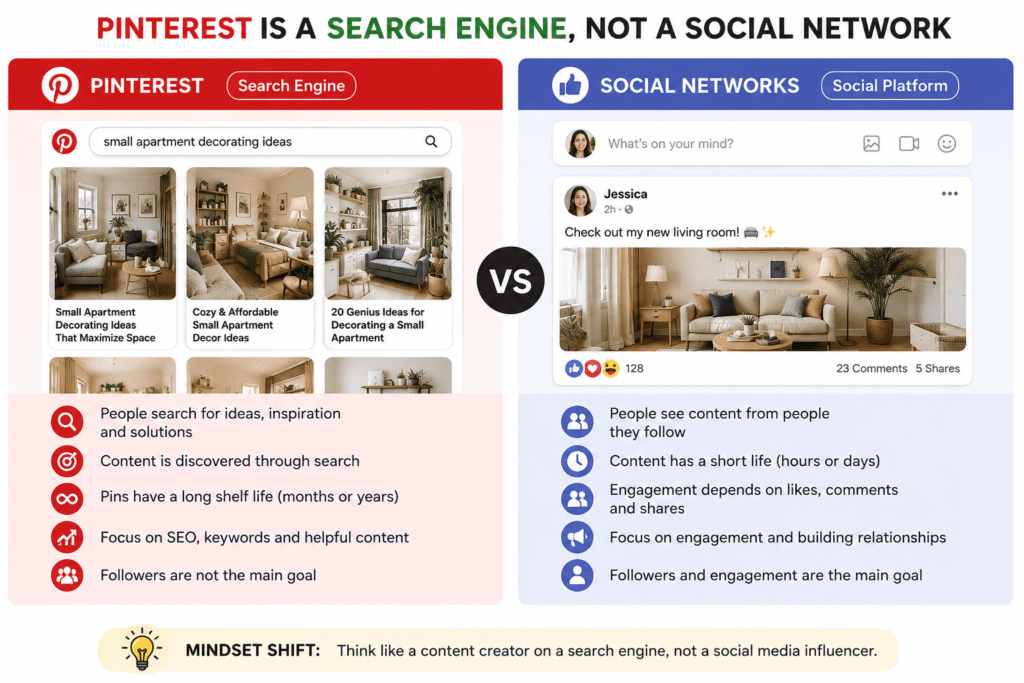
This was my biggest mindset shift. I kept treating Pinterest like Instagram — posting content and hoping followers would engage. But Pinterest isn’t really about followers the way Instagram is. It’s closer to Google than it is to TikTok.
People go to Pinterest to search for ideas, recipes, outfits, home decor, travel destinations. They type things like “boho living room ideas” or “easy weeknight pasta” into the search bar. Your job is to show up in those results — not to build a fanbase that refreshes your profile every morning.
Key Mindset ShiftOnce you start thinking of yourself as a content creator on a search engine rather than a social media influencer, everything clicks into place.
That changed how I wrote my pin descriptions, how I named my boards, and how I thought about what to post. SEO — search engine optimization — isn’t just for websites. It’s the core skill you need on Pinterest too.
Setting Up Your Profile the Right Way
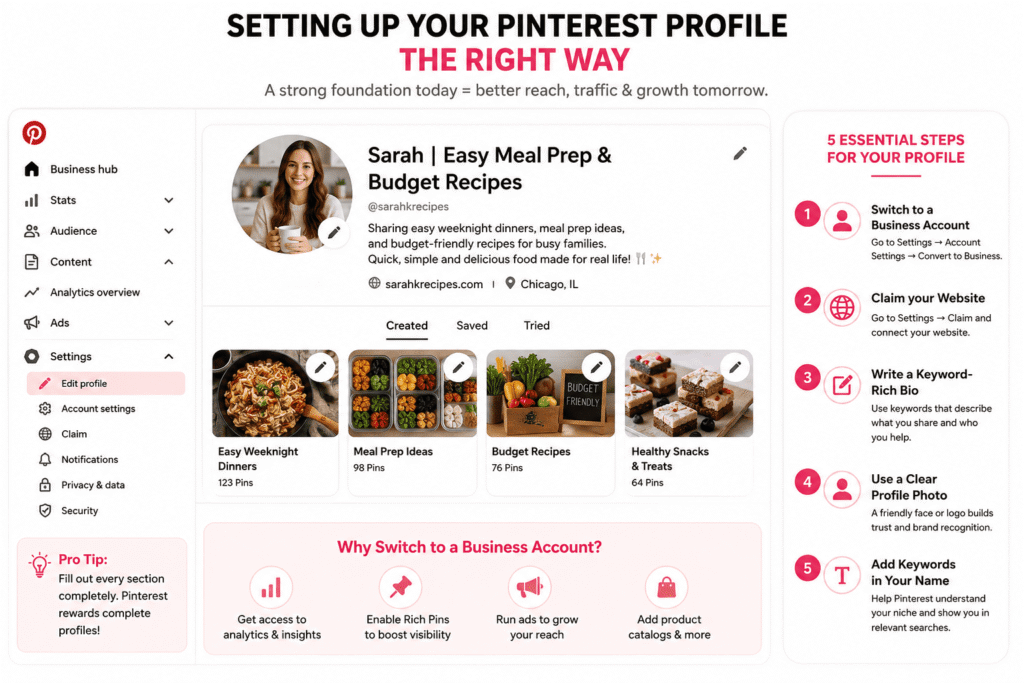
Before you pin a single thing, get your foundation right. I skipped this step and had to redo everything later, which is annoying.
- 1Switch to a Business Account. It’s free. Go to Settings → Account Settings → Convert to Business. You get analytics, rich pins, and the ability to run ads later if you want. No reason not to do this.
- 2Claim your website. If you have a blog or website, claim it under Settings → Claim. This ties your content back to you, which boosts how your pins perform.
- 3Write a keyword-rich bio. Not “just a girl who loves coffee ☕” (guilty). Instead: “Sharing easy weeknight dinners, meal prep ideas, and budget-friendly recipes for busy families.” That’s what people are searching for.
- 4Use a clear profile photo. A headshot works great if you’re a personal brand. A logo works for businesses. Avoid abstract images — people connect with faces.
- 5Name your profile with keywords too. “Sarah | Easy Meal Prep & Budget Recipes” beats just “Sarah K.” every time.
Building Boards That Actually Get Found
Your boards are like the folders of a filing cabinet, and Pinterest’s algorithm uses them to understand what your account is about. Vague boards are a missed opportunity.
When I first started, I had boards called “Food,” “Style,” and “Home.” Helpful to no one. Now I have boards like “Quick Weeknight Dinners Under 30 Minutes,” “Small Apartment Decorating Ideas,” and “Budget Travel Europe.” See the difference?
Board Naming FormulaThink about what someone would type into Pinterest’s search bar. If your board name matches that phrase, you’ve nailed it.
A few more board tips that made a real difference for me:
Write a board description. Most people leave this blank. Don’t. Write 2–3 sentences packed with relevant keywords. Pinterest uses this to understand the topic of your board and rank your pins accordingly.
Create a cover image. Boards with a curated, consistent cover photo look more professional and attract more followers. You can set this manually by going to the board, tapping the pencil icon, and choosing a specific pin as the cover.
Start with 10–15 boards max. Don’t scatter yourself. It’s better to have fewer, well-maintained boards than 40 boards with 3 pins each. Depth beats breadth on Pinterest.
The Pin Description is Where the Magic Happens
This is the part most beginners either skip entirely or write like an Instagram caption. “Obsessed with this look 😍” tells Pinterest absolutely nothing. You need actual sentences with actual keywords.
Here’s a real before-and-after from my own account:
Before“Such a cozy vibe ✨ #homeinspo #cozy”
After“Create a cozy reading nook in a small apartment with these simple and affordable decorating ideas. This corner uses a thrifted armchair, layered throw blankets, and warm Edison bulb lighting to transform a boring corner into your favorite spot in the house. Perfect for renters who want stylish small space living room ideas on a budget.”
That second version has natural keyword phrases that real people search for: “cozy reading nook,” “small apartment decorating,” “small space living room ideas,” “affordable,” “budget.” No keyword stuffing — it just reads like a helpful description.
Aim for 100–300 characters in your description. Pinterest shows a preview in the feed, so front-load the most useful information.
Design Pins That Stop the Scroll
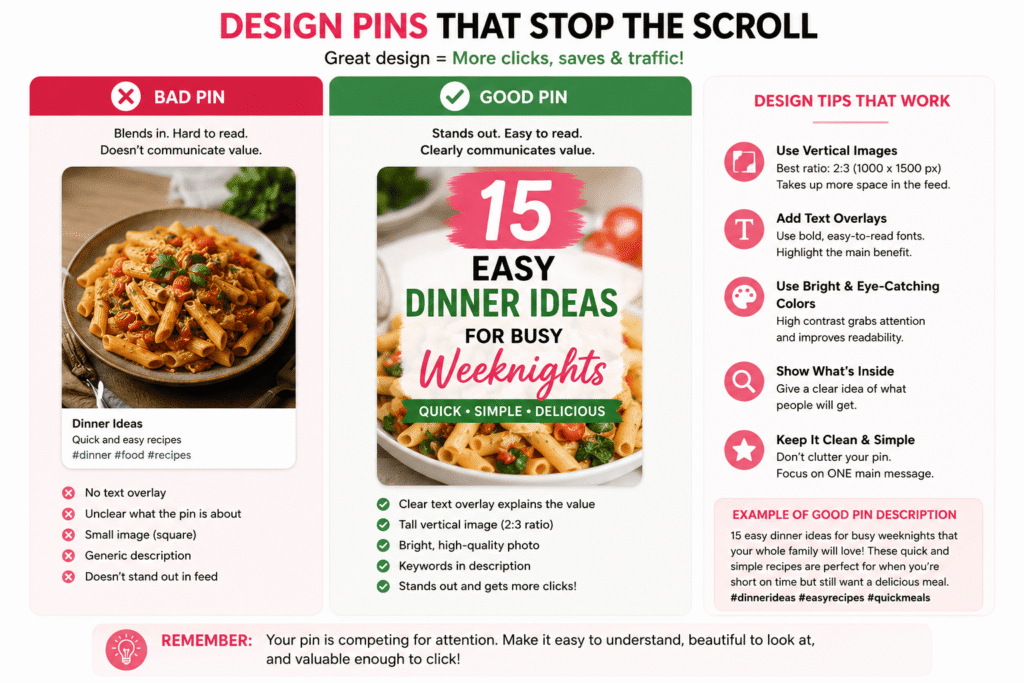
Pinterest is a visual platform, so image quality genuinely matters. But “quality” doesn’t mean you need expensive photography gear. Here’s what actually works:
Use vertical images. The ideal Pinterest image ratio is 2:3, meaning 1000px × 1500px. Tall images take up more space in the feed and get more attention. Square images get buried. Horizontal images are even worse — they shrink to almost nothing.
Add text overlays. Pins with a clear text overlay that explains what the pin is about perform significantly better. Use tools like Canva (free) or Adobe Express to add titles directly to your image. Something like “15 Easy Dinner Ideas for Busy Weeknights” printed boldly over a food photo immediately communicates value.
Choose bright, clear images. Pinterest’s own data has shown that light, bright images outperform dark or moody ones. This doesn’t mean washing everything out — just avoid underexposed or muddy photos.
Stay on-brand with colors and fonts. Once you pick 2–3 fonts and a color palette, stick with them. Over time, your pins become recognizable in the feed before someone even reads your name.
Free Tool RecommendationCanva has a Pinterest-specific template library. Search “Pinterest Pin” and you’ll find hundreds of starting points. Start there, then customize to your brand.
Consistency Beats Volume
“I used to pin 50 things on a Sunday and then nothing for two weeks. That’s exactly backward.”
Pinterest rewards consistent, steady activity. The algorithm likes accounts that show up regularly — not accounts that dump 200 pins over a weekend and then go silent. I learned this the hard way after watching my monthly views nosedive every time I took a week off.
The sweet spot for most beginners is 5–15 pins per day. That sounds like a lot, but it includes repinning other people’s content — you don’t need to create 15 original pins daily. A good mix is roughly 20% your own content, 80% repinning relevant content from others.
To make consistent pinning actually manageable, use a scheduler. Tailwind is the most popular Pinterest scheduling tool, and it has a free plan. You can batch your pinning on a Monday, schedule posts across the week, and then ignore Pinterest until next Monday. That’s how most serious Pinterest creators work.
Use Pinterest’s Own Search Tool to Find Keywords
You don’t need a fancy keyword research tool. Pinterest tells you exactly what people are searching for — you just have to look.
- 1Type a broad topic into Pinterest’s search bar but don’t press enter yet.
- 2Look at the dropdown suggestions that appear — those are real searches real users make.
- 3Now press enter. Below the search bar, you’ll see colored “guided search” bubbles — these are subtopics. Click through a few. These are pure gold for niche keywords.
- 4Note which terms appear most, and work them naturally into your pin descriptions and board names.
I built my entire content strategy around this method. No paid tools needed — just 20 minutes of clicking around Pinterest’s own search functionality.
Common Mistakes That Tank Your Pinterest Growth
✗Pinning everything to one board. Scatter your content across relevant boards. If you have a recipe post, it can go to “Easy Weeknight Dinners,” “Healthy Meal Prep,” and “Vegetarian Recipes” — three separate boards, three separate chances to be found.
✗Ignoring Pinterest Analytics. Your Business account gives you free data on which pins get the most impressions, clicks, and saves. Check it monthly. Double down on what’s already working instead of guessing.
✗Using the same pin image for every repin. Create 3–5 different design variations for your top content. Different headlines, different images, same link. This extends the reach of a single piece of content significantly.
✗Only pinning your own stuff. Repinning quality content from others in your niche builds credibility, fills your boards, and signals to Pinterest that you’re an active, engaged user.
✗Giving up after 30 days. Pinterest is the slowest of all platforms to gain traction, and also the most evergreen. A pin you post today can go viral 18 months from now. Most people quit right before things start to click.
Rich Pins — Set Them Up Once, Benefit Forever
Rich Pins automatically pull extra information from your website — things like recipe ingredients, article headlines, or product prices — and display them directly on the pin. They look more professional and tend to get higher engagement.
To enable them, you add a small piece of metadata to your website (most WordPress plugins like Yoast handle this automatically), then validate your site at developers.pinterest.com/tools/url-debugger. It takes about 10 minutes to set up and you never have to think about it again.
The Seasonal Content Secret
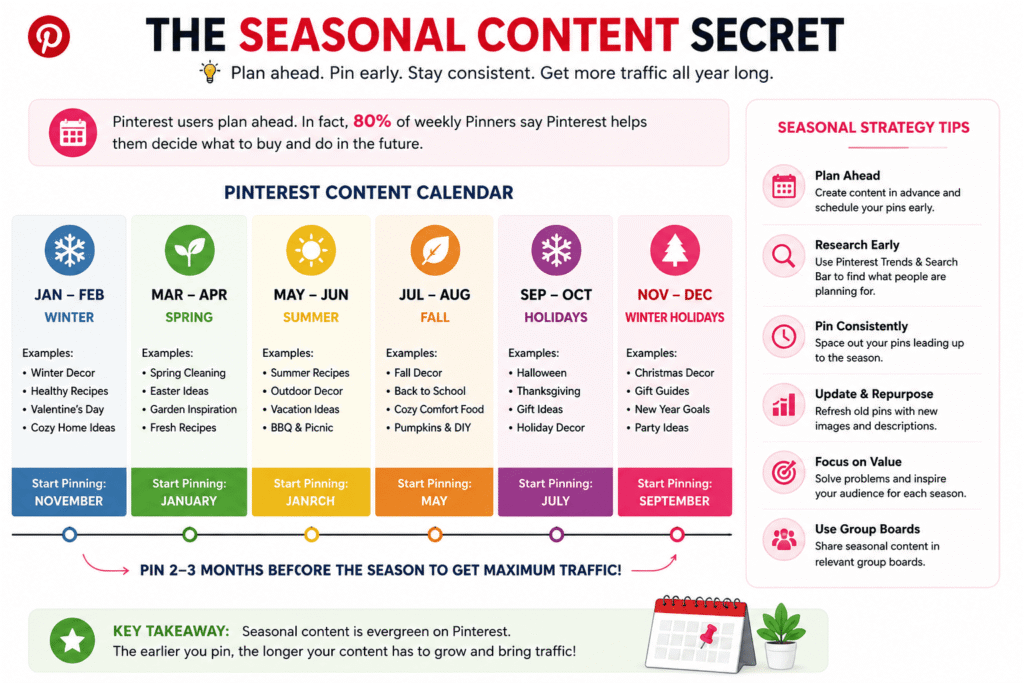
Pinterest users plan ahead. Way ahead. Someone searching for “Christmas cookie recipes” isn’t doing it on December 24th — they’re searching in October and November. People look for Valentine’s Day ideas in January. Back-to-school content peaks in June.
Start creating and pinning seasonal content at least 45 days before the actual date. I now keep a simple Google Sheet with seasonal content deadlines and I batch-create pins 6–8 weeks in advance. This one habit probably tripled my seasonal traffic.
45 days before holidaysBatch create contentUse Tailwind to scheduleCheck Analytics monthly
Group Boards — Worth It or Not?
Group boards used to be a massive growth hack on Pinterest. You’d join a group board with thousands of followers and instantly get your pins in front of a huge audience. That era is mostly over — Pinterest shifted its algorithm to favour fresh, individual pins over group board content around 2019.
That said, niche group boards still have value in 2024, especially in very specific topics. If you find an active, well-maintained group board in your exact niche, it’s worth joining. But don’t chase follower count as your primary strategy. Focus on your own boards and consistent content first.
One Last Thing Nobody Tells You
Pinterest is genuinely one of the best platforms for driving real, lasting traffic to a website — better than Instagram in most cases, better than Facebook for most niches. The pins you create today keep working for months and years. There’s no algorithm that buries your content after 24 hours.
But it requires patience that most people underestimate. My account didn’t really take off until month four. Then month five was double month four. Month six was double month five. The growth is slow and then suddenly it isn’t — but you have to stick around long enough to reach that inflection point.
If you nail the basics — keyword-rich descriptions, vertical images, consistent pinning, and a properly set-up business profile — you’re already doing better than the majority of Pinterest users. The rest is just time and iteration.
Go make your first properly optimized pin and see what happens.