Pinterest SEO Tips That Actually Work
A few years back I spent three weeks redesigning my home office, photographed everything, wrote detailed captions, pinned consistently — and got basically nothing. Like, maybe 40 saves over a month. Meanwhile, a blurry flat-lay someone posted in 2022 was still getting repinned every single day. I was genuinely baffled.
That’s when I stopped treating Pinterest like Instagram and started treating it like what it actually is: a search engine with a pretty face.
Since then, my monthly views have gone from around 11k to over 3.2 million. Not overnight — it took about seven months of consistent, intentional effort. But the shift wasn’t about posting more. It was about understanding how Pinterest actually decides what to show people.
Here’s everything I’ve learned — including the stuff I got completely wrong before I figured it out.
Why Pinterest SEO in 2026 is genuinely different
Pinterest rolled out several updates to its Taste Graph and visual search algorithm over the past year. The platform now blends keyword relevance with engagement signals, save velocity, and what Pinterest calls “idea freshness.” This means the old advice — just stuff your description with keywords — actively hurts you now.
The algorithm also got a lot smarter about board quality. It’s not enough to have 300 pins in a board titled “Recipes” anymore. Pinterest now evaluates whether a board is cohesive, well-described, and genuinely useful to a specific person searching for a specific thing.
The good news? If you set this up correctly once, pins can drive traffic for years. I still get daily saves from pins I made in 2023.
The 7 Pinterest SEO moves that actually move the needle
Tip 01
Nail the first 40 characters of your title
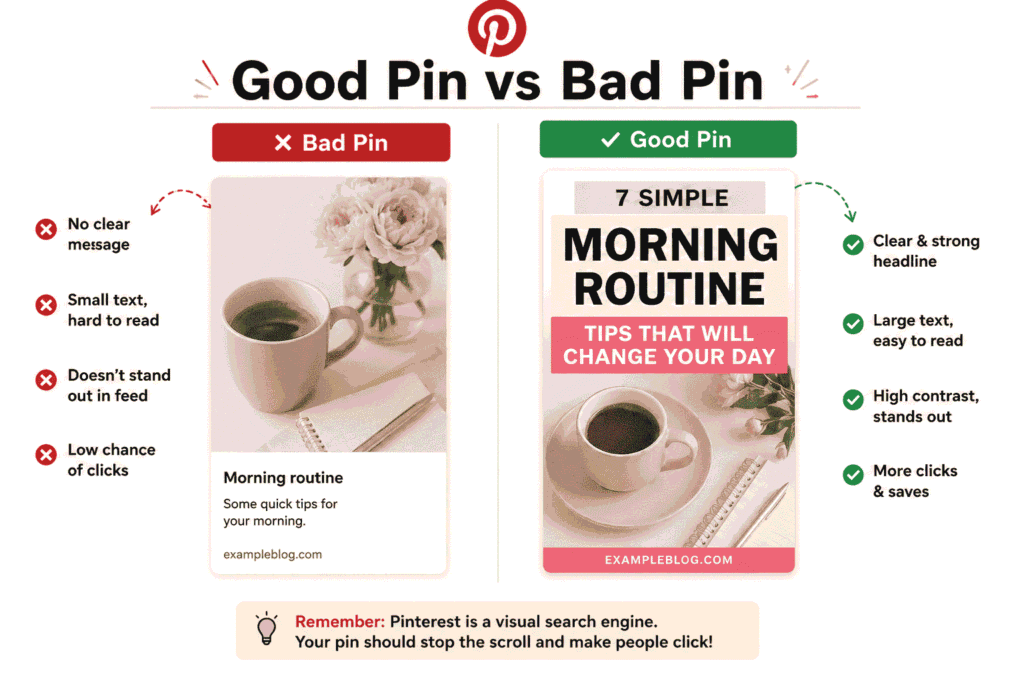
Pinterest truncates titles in most feed views. Front-load your most specific keyword — not a clever hook, not your brand name.
Tip 02
Write descriptions like a human, not a tag cloud
Two to three sentences. Use your primary keyword once, a secondary keyword once. Then just describe what’s actually useful about the pin.
Tip 03
Board names are SEO real estate
“Home Decor Ideas” is wasted. “Small Apartment Bedroom Decor on a Budget” is a search term people actually type.
Tip 04
Use Pinterest’s own search bar for keyword research
Type a seed keyword and watch the autocomplete suggestions. Those are real searches. Use the “more ideas” bubbles too — pure gold.
Tip 05
Fresh pins beat resharing old ones
Create new images for the same content rather than re-pinning the same image. New image URL = treated as a fresh pin by the algorithm.
Tip 06
Pin to the most relevant board first
The first board a pin goes to heavily influences how Pinterest categorizes it. Don’t post to your “Everything” catch-all board first.
Tip 07
Alt text is not optional anymore
Pinterest’s visual search reads image alt text. Fill it in every time. Describe the image factually, include your keyword naturally.
Real talk: I ignored board descriptions for two years. I thought they didn’t matter. When I finally went back and wrote proper keyword-rich descriptions for my 14 main boards, my impressions went up 34% in six weeks without posting a single new pin. Don’t skip board SEO.
How to actually do keyword research on Pinterest (step by step)
1
Start with Pinterest’s search bar
Open Pinterest, type a broad term related to your niche (e.g. “home office setup”), and pause before hitting enter. The autocomplete dropdown shows the most searched variations. Screenshot these.
2
Hit search and check the topic bubbles
After searching, colored topic bubbles appear at the top of results. These are Pinterest’s own category subdivisions — they reveal exactly how users think about your topic. Add the most relevant ones to your keyword list.
3
Look at what’s actually ranking
Scroll through the top 20 results for your keyword. Read their titles and descriptions. Notice which words appear repeatedly. You’re reverse-engineering what Pinterest already decided is relevant.
4
Cross-check with Pinterest Trends

Go to pinterest.com/trends and type your keywords. This shows seasonality — crucial for knowing when to start pinning about a topic. Holiday content needs to go up 45–60 days early on Pinterest, not one week before.
5
Build a keyword map, not just a list
Organize your keywords into: one primary (goes in title), one or two secondary (go in description), and two or three related terms (go in board description and alt text). Don’t use all of them everywhere — that’s keyword stuffing.
Tools I actually use (not sponsored)
People ask me all the time if you need paid tools for Pinterest SEO. Honestly, for most creators, you don’t — at least not to start.
Pinterest Trends (free)Pinterest Analytics (free)Tailwind (scheduling + communities)Canva (pin design)Pin Inspector (keyword research)Semrush (cross-checking search volume)
Tailwind is the one paid tool I wouldn’t give up. The SmartSchedule feature alone saved me hours per week, and the Communities (formerly Tribes) feature helped my new pins get early saves, which boosts them in the algorithm during that critical first 48–72 hour window.
Pin Inspector is worth it if you’re doing serious niche research — it pulls keyword data directly from Pinterest in bulk. But if you’re just starting out, the native search bar will get you 80% of the way there for free.
Mistakes I see constantly (and made myself)
- mistakePosting 30 pins in one day, then nothing for two weeks. Pinterest rewards consistency over volume. 5–10 pins a day beats 50 pins on Monday and silence the rest of the week.
- mistakeUsing hashtags the way you would on Instagram. Pinterest hashtags work differently — they’re treated more like keywords, and stuffing 20 of them in a description actually signals spam. Use 2–5 max, and only when they’re genuinely descriptive.
- mistakeIgnoring the “Related Topics” section on pins that are performing well. This is Pinterest literally telling you what to create next. I check this weekly and build my content calendar from it.
- mistakeCreating beautiful pins that link to a bad landing page. Pinterest can now track bounce rate signals. If people click through and immediately leave, your pin’s distribution gets throttled. Your destination page matters.
- mistakeTreating video pins as an afterthought. Idea Pins and video pins get significantly higher organic reach right now because Pinterest is pushing video hard to compete with short-form platforms. A 15-second “quick tip” video often outperforms a static pin on the same topic.
- mistakeNever looking at Pinterest Analytics. I went months without checking it properly. When I finally dug in, I discovered that 60% of my traffic was coming from three boards — and I’d been neglecting all three. Data tells you where to double down.
Unexpected win: My most-saved pin of all time is not a beautiful, carefully designed graphic. It’s a simple text-on-white-background pin with a very specific title: “17 small bedroom organization ideas under $30.” It ranks for about 40 keyword variations and has been saving consistently for 18 months. Specificity beats aesthetics.
A note on how long this actually takes
I want to be straight with you: Pinterest SEO is not a fast strategy. It took me about three months before I saw meaningful traction, and six months before it started driving serious traffic. If you’re looking for results next week, Pinterest is not the right channel.
But if you’re building something for the long term — a blog, an online shop, a content brand — it compounds in a way that almost nothing else does. I have pins from 2023 that drove more traffic last month than they did when I first posted them. That doesn’t happen on Instagram or TikTok.
The mindset shift that helped me most was this: every pin is not a post, it’s a page. You’re building a library of indexed, searchable content. Treat each one like it matters, because it does — just maybe not until six months from now.
Where to start if you’re feeling overwhelmed: Pick one board. Write a proper board description with real keywords. Go back through your last 20 pins on that board and rewrite their titles and descriptions. See what happens over 30 days. You don’t have to do everything at once — you just have to start doing things intentionally.