The humbling moment that changed how I think about SEO
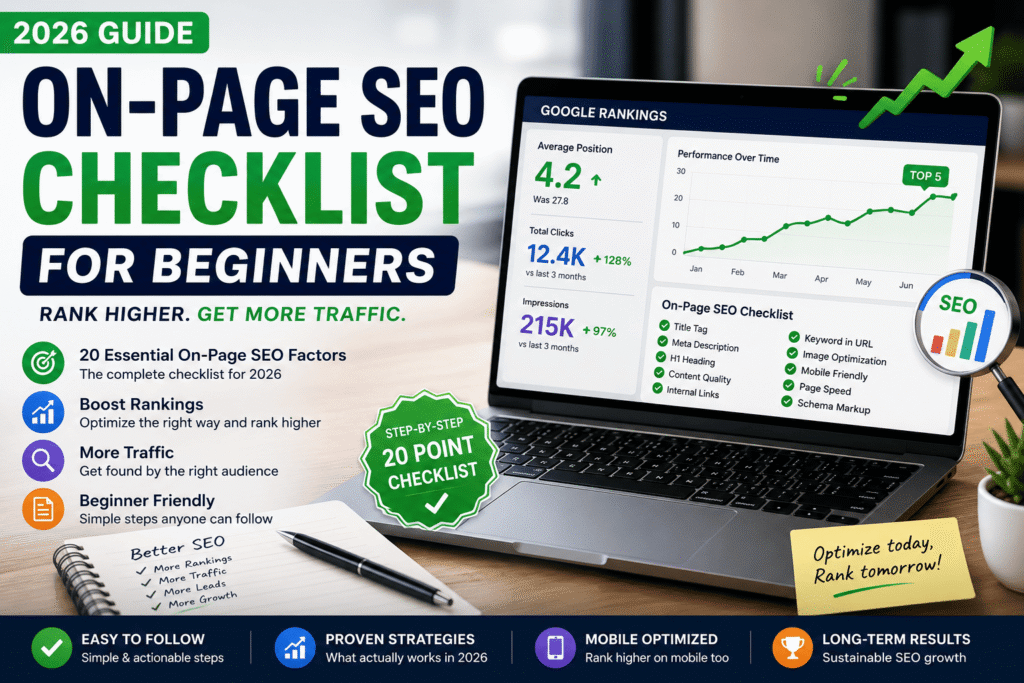
This on-page SEO checklist will help beginners improve their website rankings without advanced SEO knowledge
About three years ago, I wrote what I genuinely believed was the best article on “free project management tools” that existed on the internet. I spent a full weekend on it. I compared 14 tools, included screenshots, wrote detailed pros and cons. I was proud of it.
It sat on page 7 of Google for 11 months. I got maybe 40 visitors from search the entire time.
Then a colleague looked at it and asked, almost casually, “Did you put the main keyword in your title tag?” I hadn’t. Not properly. I had written a clever, witty title — but it didn’t actually say what the article was about in terms Google could parse cleanly. That was one of maybe eight basic on-page things I had either done wrong or not done at all.
I fixed them over a weekend. Within six weeks, that page climbed to position 4 and has stayed in the top 5 ever since. Same content. Just cleaned-up on-page signals.
That experience is why I wrote this. Because you might be making the exact same mistakes — and they’re all completely fixable.
· · ·
What on-page SEO actually means (and doesn’t)
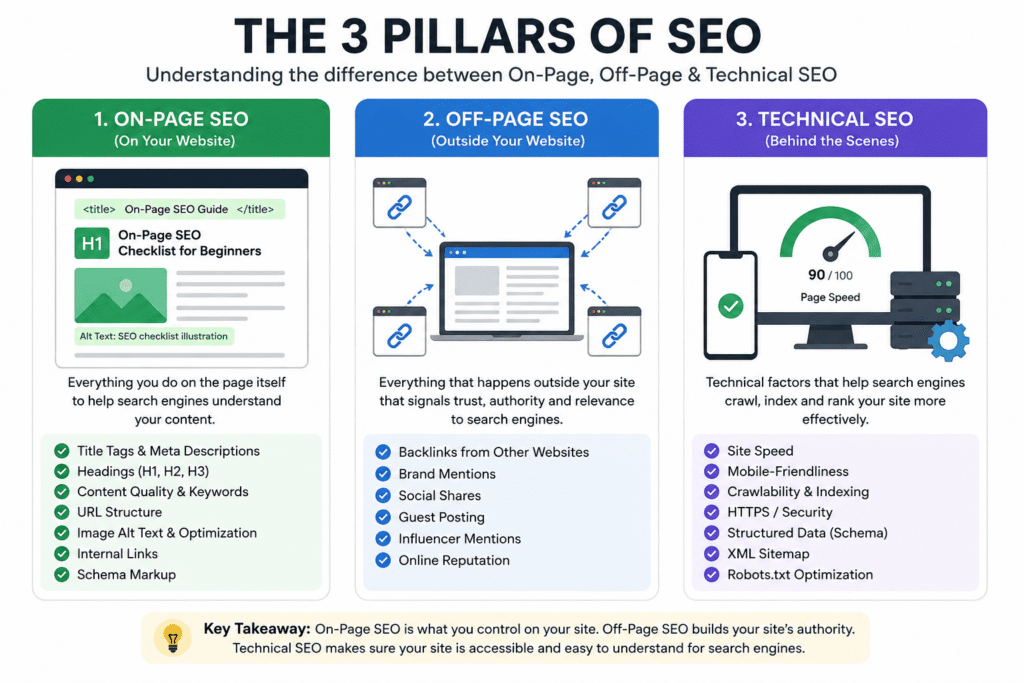
People throw “SEO” around like it’s one thing. It’s not. There are three main buckets:
On-page SEO — everything you do on the page itself. Titles, headings, content quality, internal links, image alt text, URL structure. This is what we’re covering today.
Off-page SEO — things that happen outside your site, mainly backlinks from other websites pointing to yours.
Technical SEO — site speed, crawlability, mobile-friendliness, structured data. Important, but usually comes after you’ve nailed on-page.
As a beginner, on-page is where you have the most control and where fixing things gives you the fastest visible results. You don’t need anyone else’s permission. You just need to know what to fix — and then actually fix it.
Quick reality check
On-page SEO won’t overcome terrible content, and it won’t build you overnight traffic. But if your content is solid and you’re still not ranking, there’s a very good chance it’s an on-page problem holding you back.
· · ·
The full beginner checklist — 2026 edition
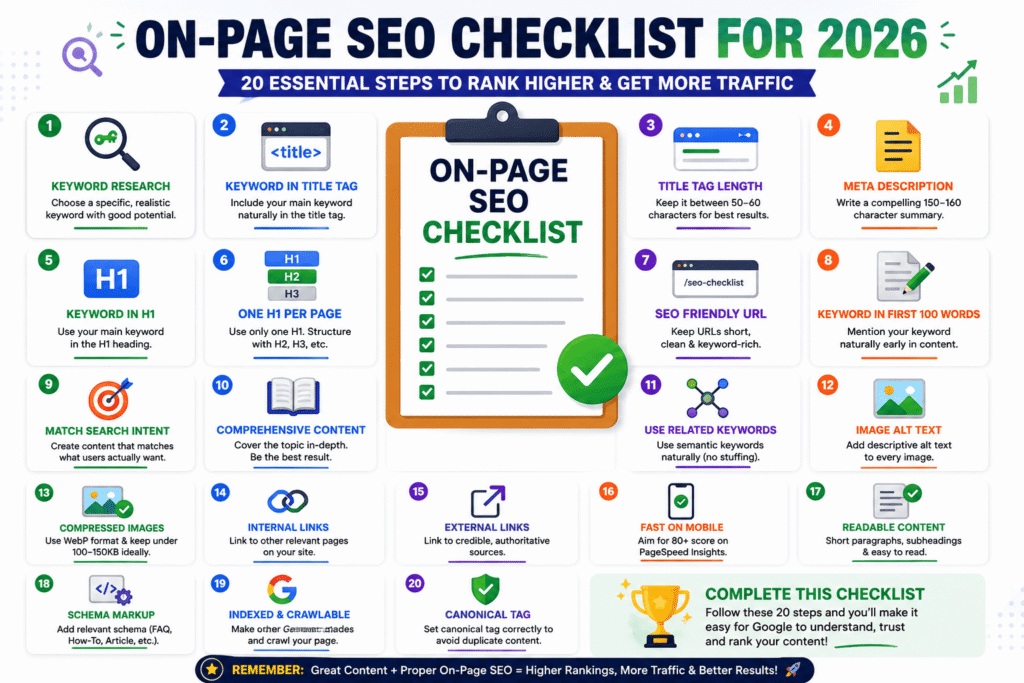
I’m going to give you the full list here, then spend more time on the items beginners consistently get wrong. Save this, bookmark it, print it — whatever you need to actually use it.
✦ On-Page SEO Checklist for 2026
Target keyword research done — You’ve picked a specific, realistic keyword (not just a broad topic)
Keyword in title tag — Main keyword appears naturally in the HTML title tag, ideally near the front
Title tag length — Between 50–60 characters so it doesn’t get cut off in search results
Meta description written — A clear, compelling 150–160 character summary that makes people want to click
Keyword in H1 — Your main heading (H1) contains the target keyword
Only one H1 per page — Don’t use multiple H1 tags; structure headings as H2, H3, etc.
URL is short and keyword-rich — Clean URL like /on-page-seo-checklist not /p=1283 or a giant slug
Keyword in first 100 words — Mention it naturally early in the content body
Content matches search intent — What people actually want when they search this term matches what your page delivers
Content is genuinely comprehensive — Covers the topic well enough that a reader doesn’t need to go elsewhere
Related/semantic keywords used naturally — Not keyword-stuffed, but related terms appear throughout
Images have descriptive alt text — Every image has alt text that describes what’s in it
Images are compressed — WebP format, under 100–150KB ideally; use tools like Squoosh
Internal links included — You link to other relevant pages on your own site (and they link back)
External links to credible sources — Link out to authoritative sources where it adds value
Page loads fast on mobile — Test with Google PageSpeed Insights; aim for 80+ score
Content is readable — Short paragraphs, subheadings, no walls of text
Schema markup added (if relevant) — FAQ schema, How-To schema, Article schema where appropriate
Page is indexed and crawlable — Not accidentally blocked by robots.txt or noindex tags
Canonical tag set correctly — No duplicate content issues; canonical points to the right URL
That’s 20 items. Some take 30 seconds. Some take longer. Let me walk you through the ones that trip beginners up the most.
· · ·
Deep dive: the items most beginners skip
1. Search intent — the one that makes or breaks everything
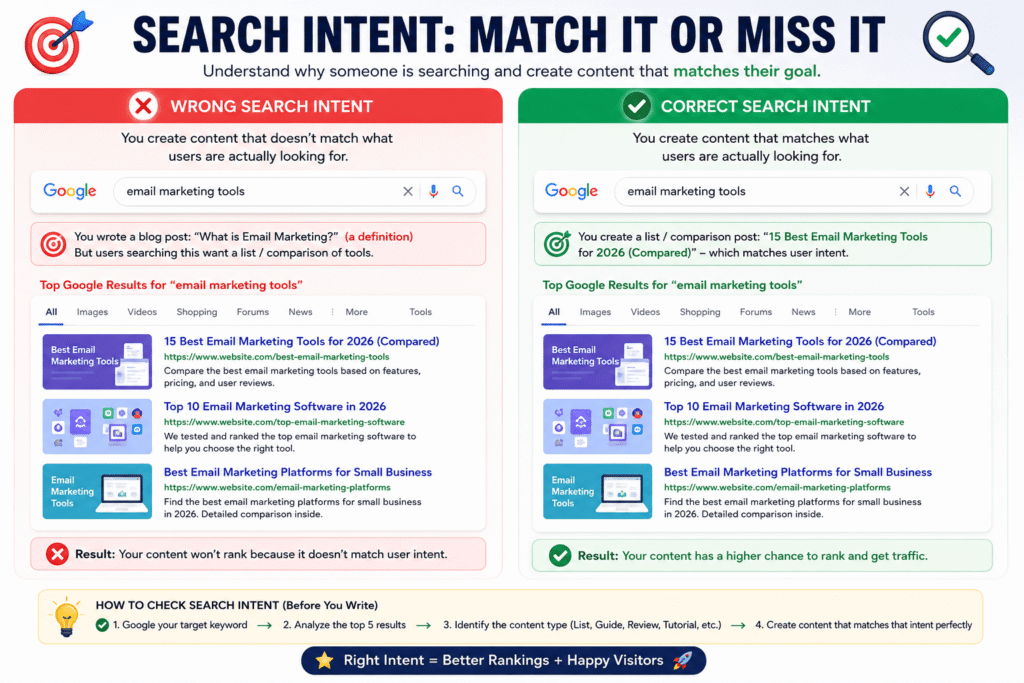
This is the most important thing on the list and the one most beginners ignore entirely. Search intent means understanding why someone is searching a given term — and matching your content to that reason.
If someone searches “best running shoes,” they want a comparison or list. If they search “how to tie running shoes for plantar fasciitis,” they want a tutorial. If they search “Nike Air Zoom Pegasus 40 review,” they want one specific product breakdown.
I once wrote a “what is email marketing” article trying to rank for “email marketing tools.” It never worked, because the intent behind “email marketing tools” is a comparison list — not a definition. Completely different things. I had great content for the wrong intent.
How to check intent
Before writing anything, Google your target keyword and look at the top 5 results. Are they listicles? Tutorials? Product pages? Landing pages? That’s your template. Match the format.
2. Title tag vs. H1 — they’re not the same thing
This confused me for longer than I’d like to admit. The title tag is what appears in Google search results and the browser tab. The H1 is the main heading that appears at the top of your actual article.
They should be similar, but they don’t have to be identical. Your title tag should be 50–60 characters and keyword-front-loaded. Your H1 can be longer, more creative, or more specific. Both should contain your main keyword.
In WordPress, your post title often becomes both the H1 and the title tag by default — but with plugins like Yoast or Rank Math, you can customize the title tag separately. Always do this.
3. URL structure — keep it short and clean
I’ve seen URLs like /blog/2024/05/12/what-is-on-page-seo-and-why-does-it-matter-for-your-business-website/. That’s a mess. Google likes short, descriptive URLs. Something like /on-page-seo-guide is better in every way — easier to read, easier to share, and cleaner for search engines to parse.
Remove stop words (is, the, a, and, for) from your URL when possible. Keep it to 3–5 words max.
4. Internal linking — the most underused tactic in SEO
Most beginners focus entirely on getting links from other websites. Fair — backlinks matter. But internal links (linking to your own other pages) are free, instant, and completely in your control.
When you write a new article, go back to older related articles and add a link to the new one. When you write a new article, link out to your older relevant content. This distributes “link equity” around your site and helps Google understand which of your pages are most important.
I started doing this properly about 18 months ago, and some of my older posts that had been stagnant for over a year started climbing again. Not dramatically, but steadily — which is what sustainable SEO looks like.
5. Image optimization — surprisingly impactful
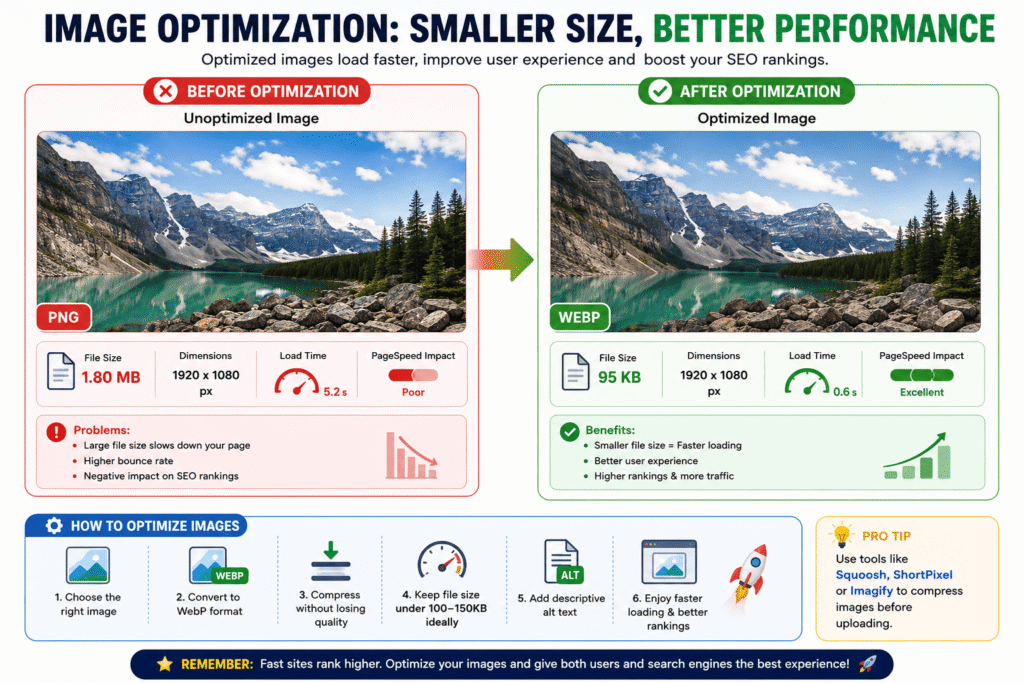
Heavy images are one of the most common reasons sites load slowly on mobile. And slow loading hurts rankings. The fix is simple: compress your images before uploading.
Convert to WebP format (most modern browsers support it, and WordPress 6.x handles it natively now). Run images through Squoosh (free, browser-based) or use ShortPixel or Imagify as a WordPress plugin. Get your images under 100KB where possible without losing visible quality.
Also: don’t leave alt text blank. Describe what’s in the image. It helps visually impaired users, and it helps Google understand your page’s context.
6. The meta description myth
Here’s something people get wrong: meta descriptions don’t directly affect your rankings. Google has said this. But they massively affect whether people click your result.
A well-written meta description tells the searcher exactly what they’ll get if they click. It’s ad copy, essentially. If your click-through rate goes up because your meta description is compelling, Google notices that signal — and it can indirectly help you hold or improve your ranking.
Write it like a pitch. 150–160 characters. Include the keyword naturally. End with something that makes people want to click.
7. Content freshness in 2026
This matters more now than it did a few years ago. Google has been heavily rewarding updated, current content — especially in competitive niches. If you wrote something in 2022 and never touched it, you’re probably losing rankings to fresher versions of the same content.
Go back to your best-performing articles every 6–12 months. Update statistics, swap out outdated screenshots, add new sections for things that have changed. Change the published date only if the content is meaningfully updated (not just a small tweak). This simple habit has kept several of my older posts ranking well past their “expiry date.”
“The best SEO strategy is still the simplest one: write something genuinely useful, then make sure Google can actually understand what it’s about.”
· · ·
Tools I actually use
I’m not going to recommend things I’ve never opened. Here are the tools I use regularly for on-page SEO:
1
Ahrefs or Semrush — for keyword research
Both are paid, both are excellent. If budget is tight, Ahrefs has a cheaper entry-level plan now. For complete beginners, Semrush’s free tier lets you do limited keyword research before committing.
2
Rank Math or Yoast SEO — for WordPress optimization
Both plugins walk you through on-page elements as you write. Rank Math has a better free version in my opinion. Either one helps you avoid the most common mistakes without needing to know code.
3
Google Search Console — free and essential
This is the most underused free tool in SEO. It shows you exactly which queries are bringing people to your site, your click-through rates, average positions, and which pages have indexing issues. If you haven’t set this up yet, do it today.
4
Google PageSpeed Insights — for page speed checks
Free. Paste your URL, get a score, see what’s slowing things down. Mobile score matters more than desktop now, so prioritize that number.
5
Squoosh — for image compression
Free browser tool from Google. Drag your image in, convert to WebP, compress it, download it. Takes under a minute per image. No signup required.
6
Surfer SEO or Clearscope — for content optimization (optional)
These tools analyze top-ranking pages for your keyword and suggest which terms to include in your content. Expensive, but genuinely useful if you’re writing a lot of content. Not necessary for beginners starting out.
AhrefsSemrushRank MathYoast SEOGoogle Search ConsolePageSpeed InsightsSquooshSurfer SEO
· · ·
Mistakes I wish I hadn’t made
Learning SEO from your own mistakes is fine. Learning from someone else’s is faster. Here are the ones I see constantly — including ones I made myself.
Targeting keywords that are too competitive. As a new site, you will not outrank Wikipedia, Forbes, or established authority sites for broad keywords. Start with long-tail, specific keywords where the competition is beatable. “Project management tools for freelance designers” is more winnable than “project management tools.”
Keyword stuffing. Writing your keyword into every other sentence doesn’t help — it actively hurts. Google’s algorithms recognize it, penalize for it, and readers find it annoying. Use your keyword where it makes sense, then use related terms naturally everywhere else.
Writing for search engines instead of people. The irony of modern SEO is that the best way to rank is to actually help the person reading your page. If they bounce immediately because your content is thin or confusing, Google notices. Write for humans; optimize for search engines.
Ignoring mobile experience. Over 60% of Google searches happen on mobile. If your page looks fine on desktop but is a mess on a phone, you’re losing most of your potential audience. Test on an actual phone, not just a browser resize.
Publishing and forgetting. SEO isn’t a set-it-and-forget-it thing. Your competitors update their content. New information becomes available. Google’s ranking criteria evolve. Pages that aren’t maintained slowly lose ground. Build a habit of revisiting your top pages quarterly.
Chasing every algorithm update. Every time Google rolls out an update, there are thousands of blog posts about what it means and what you should change. Most of the time, if you’re creating genuinely helpful content and following basic on-page best practices, updates won’t hurt you. Focus on fundamentals, not panicking about every tweak.
Important in 2026
AI-generated content is everywhere. Google has gotten significantly better at identifying thin, low-value AI content and ranking it lower. This doesn’t mean AI tools are useless — but it does mean using AI to generate content and publishing it without adding real insight, experience, or original perspective is a losing strategy.
· · ·
Where to go from here
If you just read through all of this and felt a little overwhelmed — that’s completely normal. SEO has a lot of moving parts. But the thing I want you to take away is that on-page SEO is learnable. It doesn’t require a marketing degree or a big budget. It just requires attention and consistency.
My suggestion: pick your most important existing page or article. Run it against the 20-item checklist above. Fix the things that are wrong. Then move on to the next page. That’s it. That’s the whole strategy when you’re starting out.
Don’t try to optimize 50 pages at once. Pick your best content, give it proper on-page treatment, watch what happens in Google Search Console over the next 6–8 weeks, and learn from those results. Then repeat.
The bloggers and site owners I’ve seen grow fastest aren’t the ones who knew the most about SEO — they’re the ones who consistently applied the basics and didn’t stop. Fundamentals, applied repeatedly, compound over time.
And hey — that article about project management tools that sat on page 7 for 11 months? It’s still ranking in the top 5 three years later. I haven’t touched it since I fixed those basic on-page issues. That’s the whole point. Get it right once, and it keeps working.
Your first action step
Right now, go to your most important page and check three things: (1) Does the title tag contain your keyword in the first 60 characters? (2) Does the URL contain the keyword and nothing extra? (3) Does the content actually match what someone searching that keyword wants to find? Fix those three and you’re already ahead of most beginners.