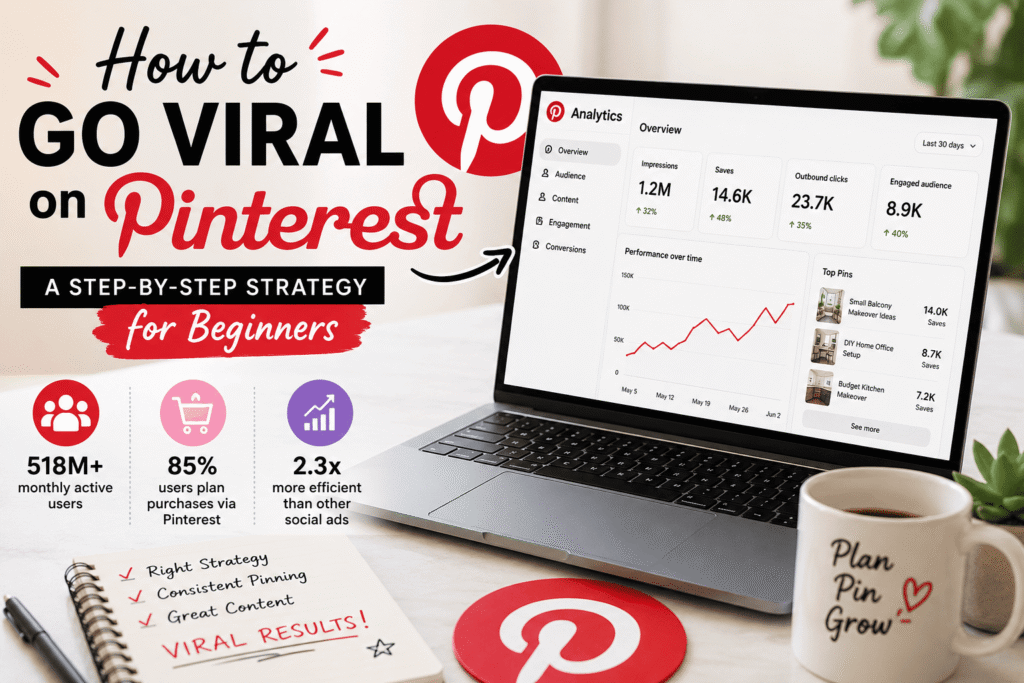
“I pinned something on a Tuesday afternoon, went to sleep, and woke up to 14,000 saves. I hadn’t done anything special — or so I thought. It took me another three months to figure out exactly why that happened, and how to make it happen again.”
That was me, about two years into using Pinterest for my home décor blog. For the longest time, Pinterest felt like a black box. I’d post, pin, pray — and get basically nothing. My pins would sit there with maybe 12 impressions and four saves, three of which were from me trying to figure out if it even worked.
Then something clicked. Not all at once, but gradually. And now, Pinterest consistently sends more traffic to my blog than Instagram and Twitter combined. I’m talking 40,000+ monthly views from Pinterest alone.
If you’re just starting out — or if you’ve been pinning for a while and wondering why nothing’s catching on — this guide is for you. No fluff, no recycled advice. Just what actually worked.
· · ·
First, understand how Pinterest actually works
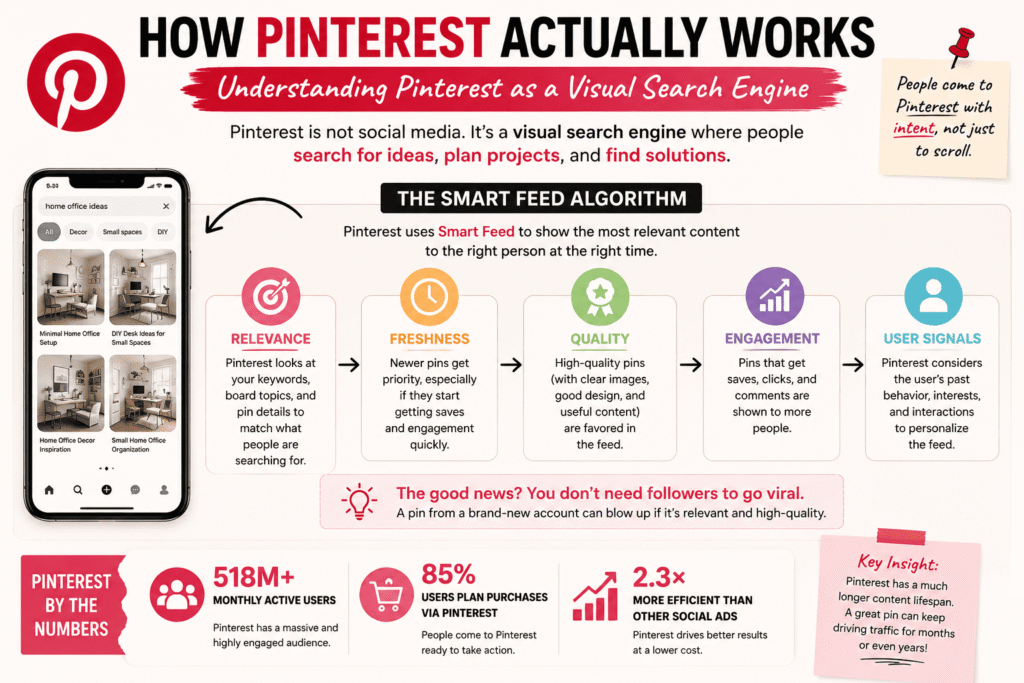
Here’s the thing most beginners get wrong: Pinterest is not a social media platform. It’s a visual search engine. People go there like they go to Google — to find ideas, plan things, solve problems. When you start thinking of it that way, everything changes.
Pinterest uses an algorithm called Smart Feed. It ranks pins based on relevance, freshness, quality, and engagement. The good news? You don’t need followers to go viral. A pin from a brand-new account can blow up if it’s relevant and high-quality. I’ve seen it happen — to me and to others I’ve coached.
Step-by-step: the strategy that actually works
1
Set up a business account (not personal)
Switch to a Pinterest Business account — it’s free. You get access to Pinterest Analytics, Rich Pins, and the ability to claim your website. Without analytics, you’re flying blind. Go to Settings → Account Settings → Convert to Business. Do this before anything else.
2
Nail your profile — it’s your SEO foundation
Your display name and bio are searchable. Put your main keyword in your name (e.g., “Sara | Home Décor & DIY Ideas”) and write a bio that mentions what kind of content you save. This isn’t vanity — it tells Pinterest’s algorithm what topics you’re relevant for.
3
Research keywords the right way
Type your niche topic into the Pinterest search bar and look at the colored bubbles that appear below — those are Pinterest’s own keyword suggestions, based on real searches. Use tools like Pinterest Trends (free, built-in) to find what’s actually gaining traction right now. This is where most beginners skip ahead too fast.
4
Design pins that stop the scroll
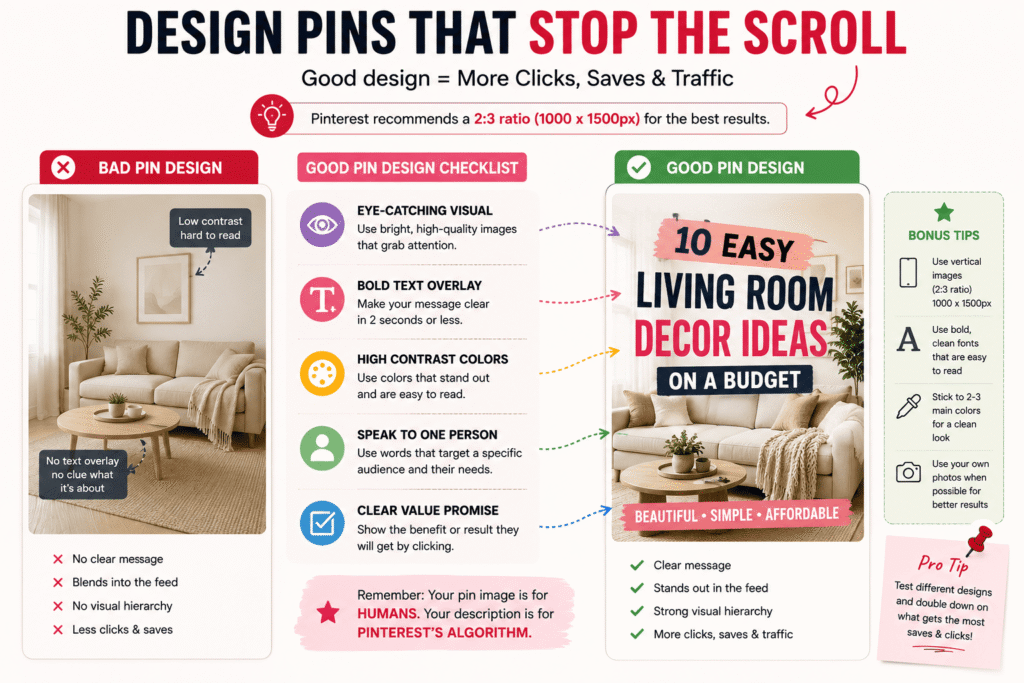
Use vertical images — Pinterest recommends a 2:3 ratio (e.g., 1000×1500px). Tools like Canva have free Pinterest templates that are already sized correctly. Use bold text overlays, high-contrast colors, and clean fonts. I noticed a dramatic jump in saves when I switched from generic stock photos to my own real photos with text overlays.
5
Write keyword-rich pin descriptions
Your pin title and description are indexed by Pinterest’s search engine. Write naturally — describe what the pin is about, who it’s for, and what they’ll learn. Include 3–5 relevant keywords without stuffing. A good description looks like: “Easy beginner sourdough bread recipe using simple pantry ingredients — no fancy equipment needed. Perfect for Sunday baking!” Not: “sourdough bread sourdough recipe bread baking.”
6
Pin consistently — but don’t spam
Pinterest rewards consistent, steady activity. Aim for 5–15 pins per day, spread out (not dumped all at once). Use a scheduling tool like Tailwind or Pinterest’s own scheduler to queue pins ahead of time. I batch-create content on Sundays and schedule it for the whole week — it saves my sanity and keeps my account active daily.
7
Create boards with strategic names
Your board names are searchable too. Instead of “My Recipes,” try “Quick Weeknight Dinner Recipes for Families.” Sounds more like something someone would search, right? Fill each board with at least 20 relevant pins before pinning your own content there — it signals to Pinterest that the board is active and thematic.
8
Enable Rich Pins for your website
Rich Pins automatically pull metadata (title, description, price if applicable) from your website. They look more professional, get more clicks, and Pinterest prioritizes them. You need to validate your site — it involves adding a meta tag and using Pinterest’s validator tool. Takes about 20 minutes but pays off forever.
9
Re-pin strategically and join group boards
Group boards are shared boards where multiple creators pin. They can massively expand your reach early on. Search for group boards in your niche using Pingroupie (free tool), reach out to board owners, and contribute quality pins. Don’t spam these — add genuine value or you’ll get removed.
10
Track, test, and double down on winners
Check your Pinterest Analytics weekly. Look at which pins get the most impressions, saves, and link clicks. Notice a pattern? Create more of that. I once discovered that my “before and after” room transformation pins got 3× more saves than regular décor tips — so I started doing those every single week.
· · ·
Tools that genuinely helped me
I’m not going to recommend tools I haven’t personally used. Here’s my actual toolkit:
Canva (free tier works fine)Tailwind for schedulingPinterest Trends (free)Pinterest Analytics (built-in)Pingroupie (group board finder)Google Search Console (check referrals)
Canva’s Pinterest templates are genuinely good. I’ve tested paid design tools and kept coming back to Canva because it’s fast. Tailwind’s SmartSchedule feature automatically finds the best times to post based on when your audience is active — that alone made a noticeable difference in my engagement.
· · ·
What I did wrong for a whole year (so you don’t have to)
🚫
Pinning without keywords
My first year, I wrote pin descriptions like captions: “Love this cozy vibe!” Pinterest had no idea what to show it for. Pure wasted effort.
🚫
Posting in bursts
I’d pin 40 things on Saturday then nothing for a week. Pinterest hates irregular activity. Consistency matters more than volume.
🚫
Ignoring vertical format
I was using square images because they looked fine on Instagram. Pinterest is not Instagram. Vertical pins take up more screen space and get way more saves.
🚫
Not linking to my website
Early on, I pinned images without linking them anywhere. What’s the point? Every pin should link to a relevant blog post, product, or landing page.
🚫
Chasing trends blindly
I tried trending topics outside my niche — they bombed. Pinterest rewards relevance. Stay in your lane, at least while you’re building authority.
🚫
Quitting too early
Pinterest takes 3–6 months to really gain traction. I nearly quit at month two. Don’t. The compound effect is real — just stay consistent.
· · ·
The viral pin formula (simplified)
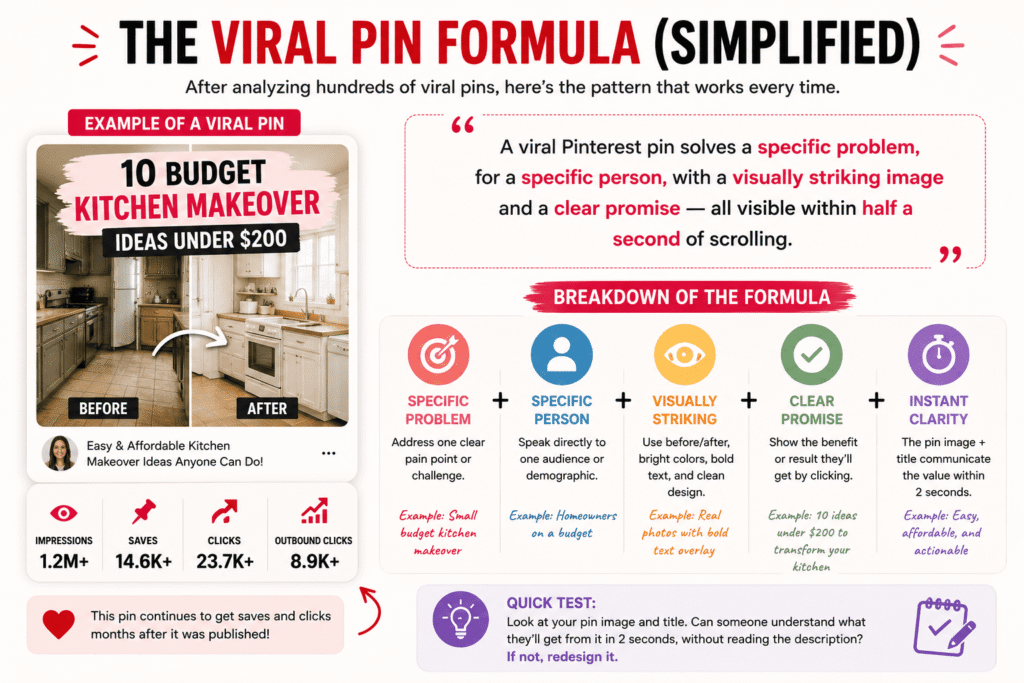
After analyzing hundreds of my own pins and studying what goes viral in different niches, here’s the pattern I keep seeing:
“A viral Pinterest pin solves a specific problem, for a specific person, with a visually striking image and a clear promise — all visible within half a second of scrolling.”
Think about it: “10 Budget Kitchen Makeover Ideas Under $200” is more likely to go viral than “Kitchen Ideas.” Why? It’s specific. It promises value. It speaks to someone with a budget. And if the image looks like an actual transformation — not a stock photo of a fancy kitchen — it stops the scroll.
Quick test: Look at your pin image and title with fresh eyes. Can someone understand what they’ll get from it within 2 seconds, without reading the description? If not, redesign it. The description is for the algorithm. The image + title is for the human.
· · ·
Realistic expectations (the honest part)
I’m not going to tell you that you’ll go viral in a week. That first viral pin of mine? It happened after eight months of consistent pinning, two total account redesigns, and probably 600+ pins that went nowhere.
But here’s the thing — once you understand how Pinterest works, the effort-to-reward ratio flips dramatically. One pin can keep driving traffic for two years. I still get saves and clicks on pins I created in 2023. That doesn’t happen on Instagram or TikTok.
Most beginners see meaningful traction in months 3–6, if they’re consistent. If you’re at month one and frustrated — that’s completely normal. Keep going.
Set a milestone goal: Instead of “I want to go viral,” try “I want to post 3 quality pins per day for 90 days.” The viral moment, when it comes, is a byproduct of showing up consistently with good content — not something you can force directly.
· · ·
One last thing that changed everything for me
About a year in, I started treating every pin like a tiny landing page — not just a pretty picture. I’d ask myself: Who is searching for this? What are they hoping to find? What problem does this solve?
That shift in thinking — from “what do I want to post” to “what does my audience need to see” — is what actually unlocked growth for me. Pinterest is generous with reach if you’re genuinely useful to people.
Start there. The strategy above is the roadmap, but that mindset is the engine.