I ran my food blog for almost two years before I touched Pinterest. I had Instagram, I was grinding on Google SEO, I even dabbled in Twitter (now X, obviously). Pinterest felt like something my mom used to plan her kitchen renovation. I was wrong, embarrassingly wrong, and it cost me roughly 18 months of traffic I could have had.
The moment that changed everything? A fellow blogger in my niche casually mentioned she was getting 80,000 monthly page views — and more than half of it came from Pinterest. Her Google traffic was decent. Her social media following was small. But Pinterest? Pinterest was quietly sending her a small army of readers every single day.
I went home and set up a business account that same night.
That was three years ago. Today, Pinterest is consistently my second-largest traffic source, often neck-and-neck with Google. And unlike Instagram where posts die in 48 hours, a good Pinterest pin can send me traffic for years. I still get clicks from pins I made in 2022. Let that sink in.
So let me share everything that actually moved the needle — not the surface-level stuff you’ll find in every generic marketing post, but the real mechanics I figured out through testing, failing, and paying attention to what the data actually said.
Why Pinterest is genuinely different from every other platform
Most social platforms are built around people. You follow people, you engage with people, you argue with people in the comments. Pinterest is built around ideas and intentions. Someone searching “easy weeknight dinners” isn’t looking for a celebrity chef to follow. They’re looking for a recipe they can make tonight.
That shift in user intent is everything. Pinterest users arrive already in discovery mode, already looking for something to click on and act on. As a blogger, you’re not interrupting their entertainment. You’re giving them exactly what they came for.
The other thing that nobody talks about enough: Pinterest is a visual search engine, not a social network. Google has hundreds of millions of bloggers competing for text rankings. Pinterest? Far less crowded, and the algorithm genuinely rewards fresh, consistent content from creators — not just domain authority built over a decade.
“Pinterest traffic is warm traffic. These people searched for something specific, found your pin, clicked through. They already want what you’re offering before they land on your page.”
The 15 Strategies
1
Set up your profile like a brand, not a person
Switch to a Pinterest Business account immediately — it’s free and unlocks analytics, Rich Pins, and ad access. Then treat your profile name as SEO real estate. Instead of just “Sarah’s Blog,” go with “Sarah | Easy Plant-Based Recipes & Meal Prep Ideas.” That description field? Fill it with natural keywords your reader would actually search. Pin a cover image to each board that looks cohesive. Presentation matters because Pinterest judges your profile quality as part of distribution.
2
Enable Rich Pins — seriously, do this today
Rich Pins pull metadata directly from your website and display it under your pin: the page title, description, and URL. This makes your pins look more authoritative and gives Pinterest’s algorithm more context about what you’re pinning. Setting them up requires adding some Open Graph meta tags to your site (most SEO plugins like Yoast or RankMath do this automatically) and then validating your domain through Pinterest’s developer tool. Takes about 20 minutes. Worth every second.
3
Treat pin titles like Google title tags
Your pin title is the most important piece of copy on the pin. It shows up in search results, it’s indexed by Pinterest’s algorithm, and it’s often the first thing a user reads. Use your main keyword naturally in the first 40 characters. “30-Minute Sheet Pan Dinners for Busy Weeknights” beats “Delicious Dinner Ideas You’ll Love!” every single time. Specificity builds trust and matches search intent.
4
Do actual keyword research before you design anything
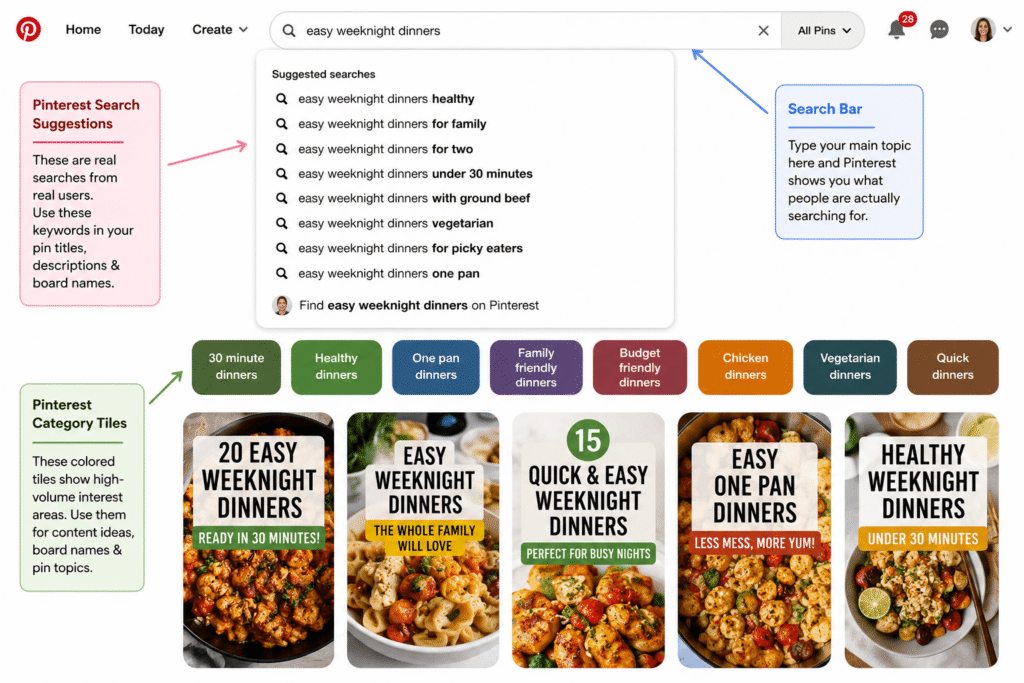
Open Pinterest, type your topic into the search bar, and look at the suggested searches that pop up. Those are real queries from real users. Also look at the colored tiles that appear under the search bar after you search — those are Pinterest’s own category suggestions and they represent high-volume interest areas. Write these down. Build your pin titles, descriptions, and board names around them. This alone will put you ahead of 90% of bloggers on the platform.
5
Design for scroll-stopping, not just “pretty”
Pinterest is a visual feed. Your pin competes with hundreds of others on screen. A few things I learned the hard way: vertical pins (2:3 ratio, so 1000x1500px) get significantly more real estate than square or horizontal ones. Bold, readable text overlays outperform text-free images because users want to know what they’re clicking before they click. High-contrast color combos — dark text on light background or vice versa — are more readable at thumbnail size. And including a human face or hands in lifestyle photos tends to increase saves and clicks. I use Canva for 90% of my pin design and it works brilliantly.
Canva for design
1000×1500px size
2–3 fonts max
High contrast text
Include your URL
6
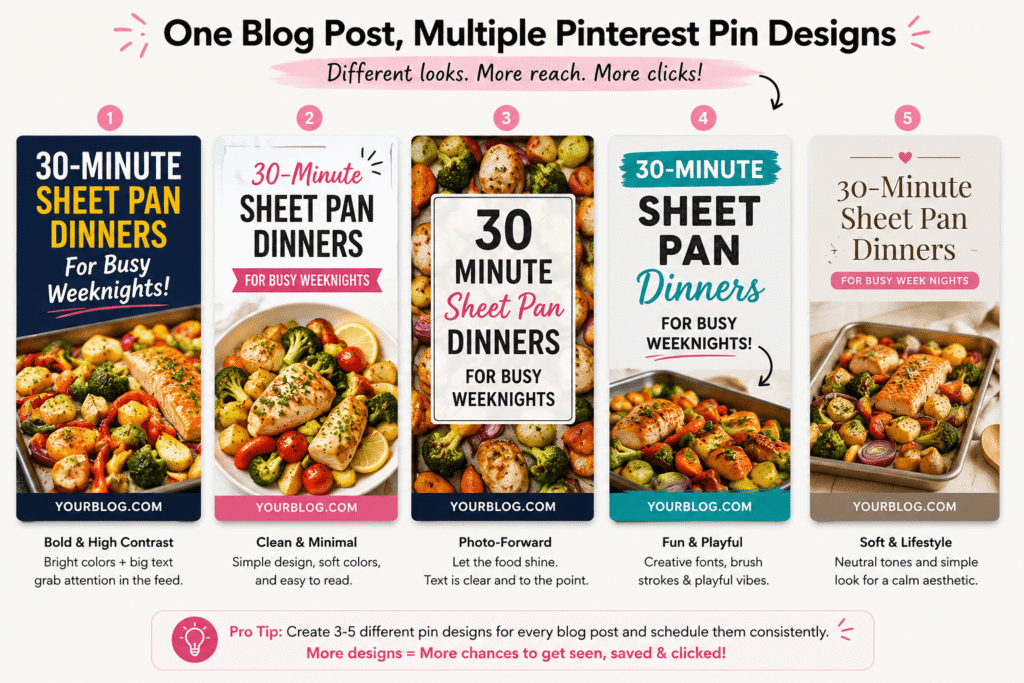
Create multiple pin designs for every blog post
This was the single biggest game-changer for me. You don’t make one pin per blog post. You make five, seven, ten. Different headlines, different color schemes, different images, different angles. One post about “meal prep for beginners” might become a pin about saving money, a pin about saving time, a pin with a numbered list of tips, and a pin with a close-up recipe photo. Then you schedule them out over weeks and watch which one takes off. You’re essentially A/B testing with real users, for free.
7
Write pin descriptions like a human who wants to be found
Pinterest reads your description text for indexing. Write 2–4 sentences that describe what the pin links to, naturally including 2–3 relevant keywords. Don’t keyword-stuff — it looks spammy and Pinterest’s algorithm has gotten smart enough to penalize it. Think of it like writing a mini blog intro: what is this about, who is it for, and why should they click? End with a subtle call-to-action like “Save this for later” or “Click through for the full guide.”
8
Build a board structure that mirrors how your readers think
Your boards should be organized around topics your audience searches for, not how you organize your blog categories internally. If you run a personal finance blog, “Budgeting Tips,” “Saving Money on Groceries,” and “Side Hustle Ideas” will perform better than “Financial Planning” as a single catch-all board. Each board should have a keyword-rich description too. Aim for 10–15 well-organized boards before worrying about anything else.
9
Build a consistent pinning routine — not a sporadic one
Pinterest rewards accounts that pin consistently over time, not accounts that post 50 pins in one day and then disappear for a month. When I started scheduling 5–10 pins per day at consistent intervals, my reach noticeably improved within 6 weeks. The best times vary by niche, but evenings (7–10 PM in your audience’s timezone) and weekends generally see higher engagement. I use Tailwind for scheduling — more on that in a moment.
10
Use Tailwind to scale without burning out
Tailwind is a Pinterest-approved scheduling tool that lets you queue up hundreds of pins in advance, see the best times to post based on your specific audience, and join “Tailwind Communities” (formerly Tribes) where bloggers in your niche share each other’s content. I batch my Pinterest work into one 2-hour session per week using Tailwind and it handles the rest. It’s not free, but it pays for itself in time saved and reach gained. The SmartSchedule feature alone is worth it.
11
Repurpose your best blog content into Idea Pins
Idea Pins (Pinterest’s version of Stories, but permanent) are getting massive reach boosts from the algorithm right now. They don’t link out directly, which frustrated me at first, but here’s the play: use Idea Pins to deliver genuine value — a quick tutorial, a 5-step process, a “before and after” transformation — and mention your blog at the end. They build brand recognition and often lead to profile follows, which then expose your regular pins to a larger audience.
12
Join and contribute to group boards (strategically)
Group boards — boards where multiple contributors can pin — used to be the holy grail of Pinterest growth. They’re less powerful than they were in 2019, but they’re not dead. The key is finding active group boards in your exact niche with engaged audiences, not dead boards with thousands of members and no recent activity. PinGroupie is a free tool that helps you find active ones. Contribute consistently and pin only your best content to them.
13
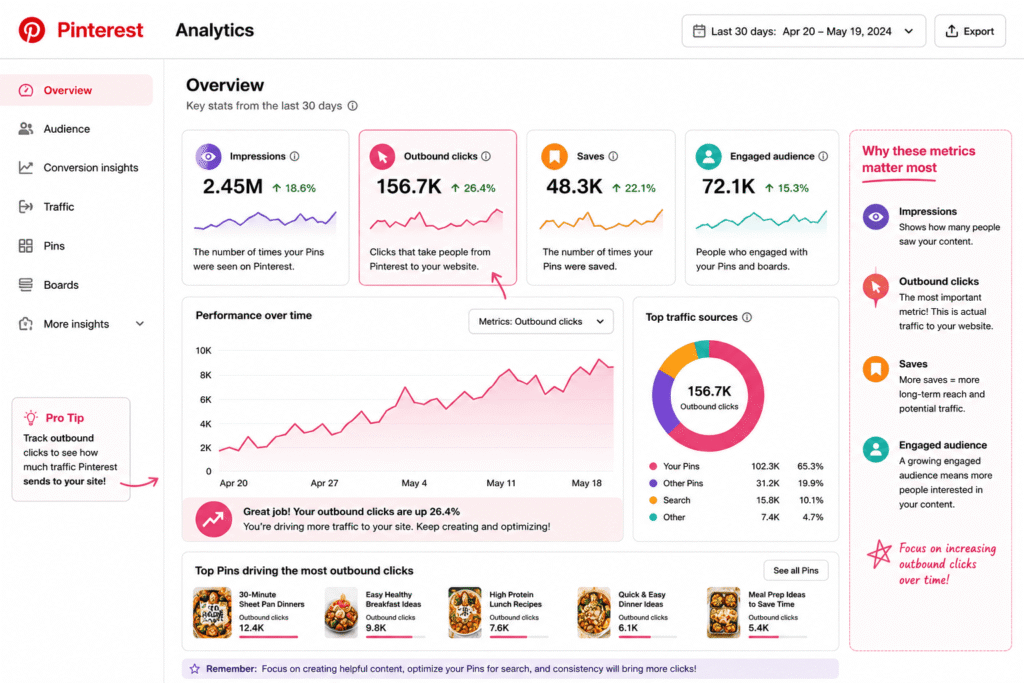
Track outbound clicks, not just impressions
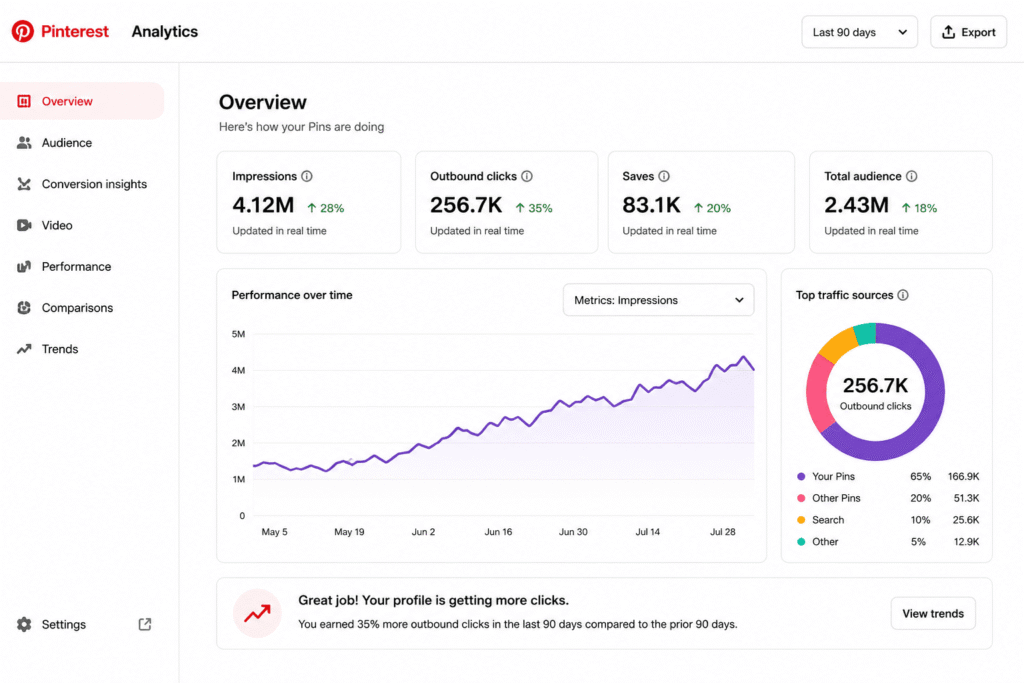
Pinterest will happily show you enormous impression numbers that feel good but mean nothing. What you actually care about is outbound clicks — how many people clicked through to your blog. In Pinterest Analytics, look at your top pins by outbound clicks and study what they have in common: the design style, the headline formula, the topic, the call to action. Then make more pins like those. Also connect Google Analytics and create a Pinterest traffic segment to see what content those visitors actually read on your site.
14
Add a “Save” button to every blog post image
This is free traffic you’re leaving on the table every day. When readers are on your blog and see an image they like, make it dead easy for them to save it to Pinterest. Most WordPress themes have Pinterest hover-button plugins (Pinterest’s own browser extension also works, but you can’t control that). The image should already be optimized for Pinterest: vertical, readable text overlay, your website name. Readers saving your content from your own blog is the highest-quality pin signal Pinterest can receive.
15
Play the long game and stop checking daily
This is probably the most important one. Pinterest is a slow-burn platform. A pin you post today might not pick up traction for 3 months. I’ve had pins completely ignore me for four months and then suddenly start driving 300+ clicks per week out of nowhere. The algorithm distributes content over time based on engagement signals. If you give up after 6 weeks because “Pinterest isn’t working,” you’re quitting right before the compound effect kicks in. Check your analytics monthly, not daily, and keep creating.
Common mistakes I see bloggers make
Using horizontal or square images
Pinterest’s feed is built for vertical content. A square pin gets half the screen space of a 2:3 vertical. This directly affects how visible your content is, which affects clicks. Make every pin 1000×1500px unless you have a very specific reason not to.
Pinning everything to one generic board
A “Blog Posts” board where you dump everything tells Pinterest nothing about your content. Specific, well-named boards signal relevance and help Pinterest match your pins to relevant searches.
Expecting overnight results
I almost quit at the 8-week mark. My traffic from Pinterest was a trickle. Then month three happened. And month six. Pinterest is a long-term investment. The bloggers who win on it are the ones who keep showing up.
Ignoring the description field
Leaving the pin description blank is like writing a blog post without a meta description. Pinterest uses it for indexing. Your readers use it to decide whether to click. Fill it in, every single time.
Pinning only your own content
Pinterest’s old guidance was to keep a ratio of roughly 80% others’ content to 20% your own. That advice is outdated, but pinning exclusively your own content still signals a spammy pattern. Save and share genuinely useful content from others in your niche. It builds community goodwill and makes your profile look like a real curator rather than a self-promotional machine.
Pinterest changed my blog’s trajectory in ways I genuinely didn’t expect. Not because I found some secret hack or followed some guru’s 30-day challenge. It was because I showed up consistently, I paid attention to what the data told me, and I gave it enough time to actually work.
If I had to give you just one piece of advice: start with the fundamentals (business account, Rich Pins, keyword-optimized boards and descriptions), create multiple vertical pins per post, schedule them consistently using a tool like Tailwind, and then give it at least 90 days before you evaluate whether it’s “working.”
Pinterest rewards bloggers who treat it seriously. Most bloggers don’t. That’s your competitive advantage right there.