Pinterest marketing for bloggers can be one of the most effective ways to generate long-term organic traffic without relying on ads or social media algorithms.
About two years ago, I was staring at my Google Analytics dashboard with that specific kind of frustration where you’ve done everything “right” and still feel stuck. I had a small online shop selling digital planners, a decent Instagram following, and a blog that got maybe 200 visitors a month on a good day. A friend casually mentioned that she’d been getting thousands of clicks a month from Pinterest — and I laughed a little, honestly. Pinterest? That place where people save wedding moodboards and soup recipes?
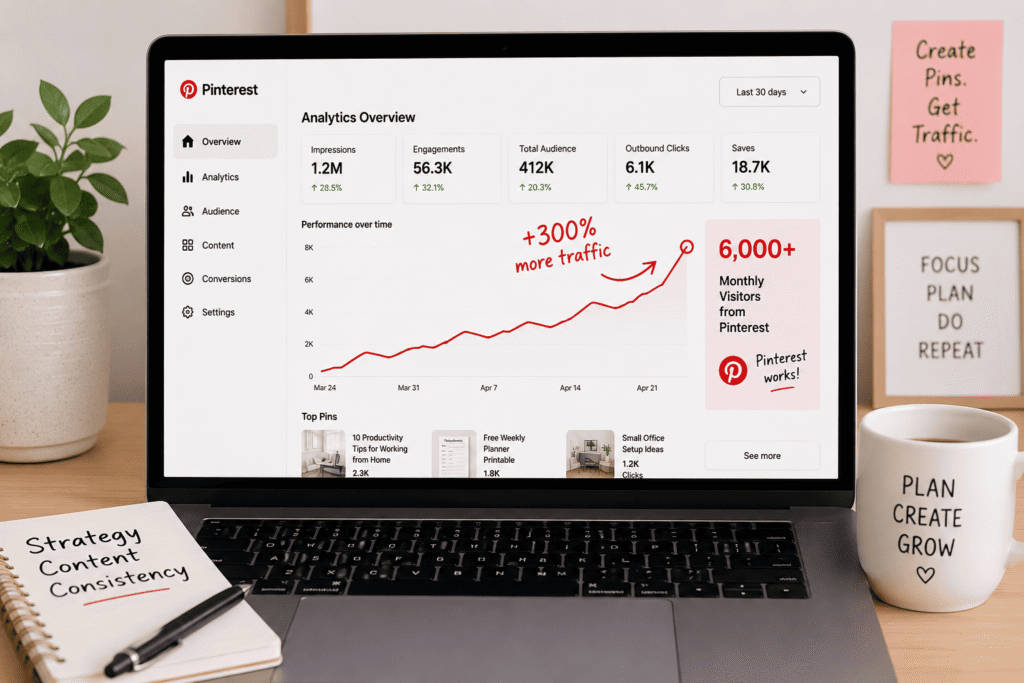
Three months later, I ate my words. Pinterest was driving over 6,000 monthly visitors to my site. My email list grew by 400 people. And I sold more digital products in one quarter than I had in the entire previous year. I hadn’t gone viral. I hadn’t run ads. I just finally learned how Pinterest actually works — and stopped treating it like Instagram.
First, understand what Pinterest actually is
This tripped me up early on. Pinterest is not a social media platform. It’s a visual search engine. People go there to discover ideas, plan purchases, and find solutions. They’re not scrolling to kill time — they have intent. When someone types “home office setup for small spaces” into Pinterest, they are actively looking for inspiration and probably ready to click and buy something.
That’s completely different energy from Instagram or TikTok. On those platforms, you’re interrupting someone’s scroll. On Pinterest, you’re answering someone’s question. That shift in mindset changes everything about how you approach it.
“Think of every Pin you create as a tiny billboard that can get found for months — sometimes years — after you post it. That’s something no Instagram post can do.”
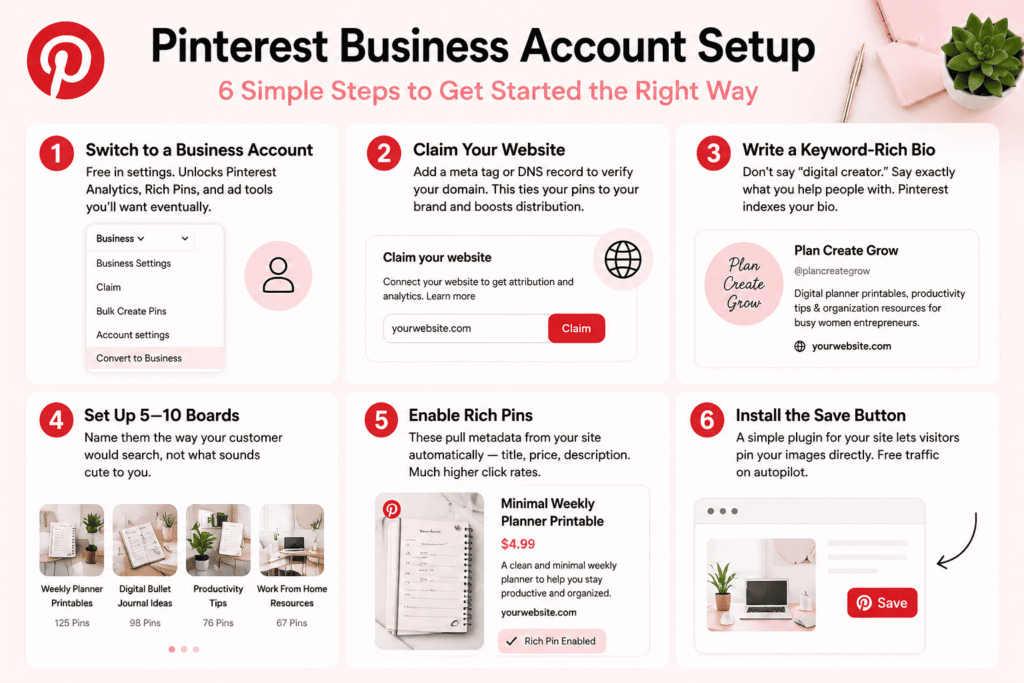
Step-by-step: setting up a business account that actually works
1
Switch to a business account
Free in settings. Unlocks Pinterest Analytics, Rich Pins, and ad tools you’ll want eventually.
2
Claim your website
Add a meta tag or DNS record to verify your domain. This ties your pins to your brand and boosts distribution.
3
Write a keyword-rich bio
Don’t say “digital creator.” Say exactly what you help people with. Pinterest indexes your bio.
4
Set up 5–10 boards
Name them the way your customer would search, not what sounds cute to you.
5
Enable Rich Pins
These pull metadata from your site automatically — title, price, description. Much higher click rates.
6
Install the Save button
A simple plugin for your site lets visitors pin your images directly. Free traffic on autopilot.
I spent my first week on Pinterest making boards with names like “Inspiration” and “My Faves.” Nobody searched for those. Once I renamed them to things like “Weekly Planner Printables” and “Digital Bullet Journal Ideas,” I started showing up in searches within two weeks.
Creating Pins that people actually click
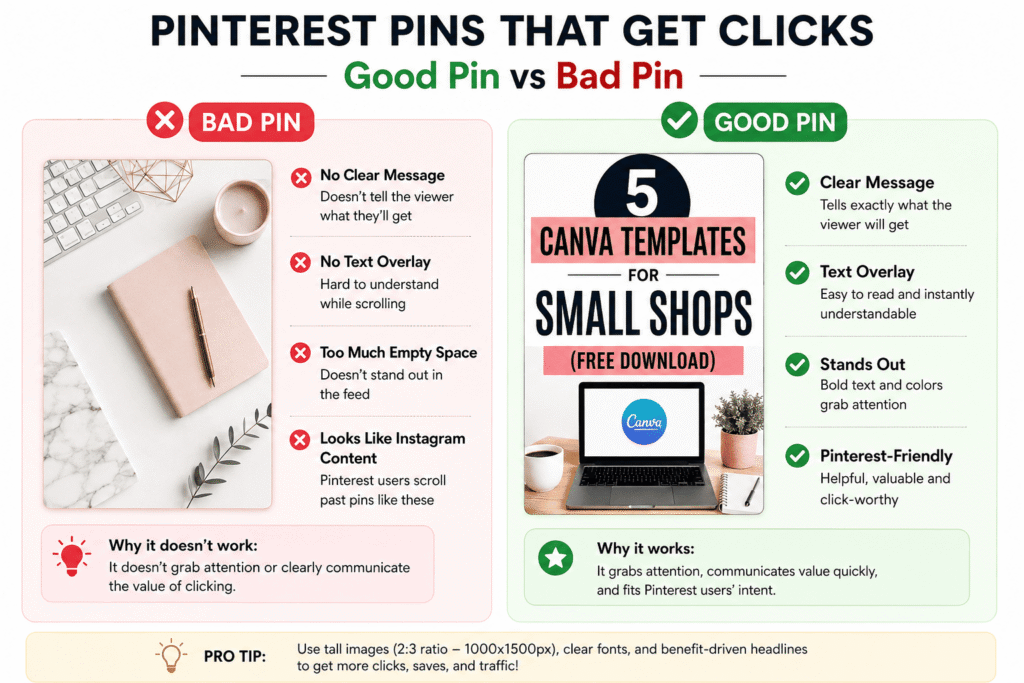
This is where most beginners fall flat. They post photos that look like Instagram content — one moody lifestyle shot, no text, no context. That doesn’t work here.
Pinterest users are scanners. They’re moving fast and they stop at images that clearly promise something useful. That means your pin should have text overlay that tells them exactly what they’ll get if they click. Something like “5 Canva Templates for Small Shops (Free Download)” performs ten times better than a pretty flat-lay of your desk.
For tools: I design almost everything in Canva. Their Pinterest templates are solid and you can batch-create multiple pin variations quickly. Tall images (2:3 ratio, ideally 1000×1500px) get far more real estate in the feed. I use their free plan for most things, though the Pro version is worth it if you’re scaling.
Create 3 to 5 different pin designs for every piece of content or product. Same URL, different images and headline angles. Pinterest will show different ones to different audiences, and you’ll quickly see which style your audience responds to most.
Font matters more than you’d expect. Thin decorative scripts look gorgeous in your head and are completely unreadable when someone is scrolling on a phone. Use bold, clean sans-serif fonts for your main headline text. I learned this after spending two hours designing pins that got zero saves because nobody could read what they said.
The keyword strategy nobody told me about
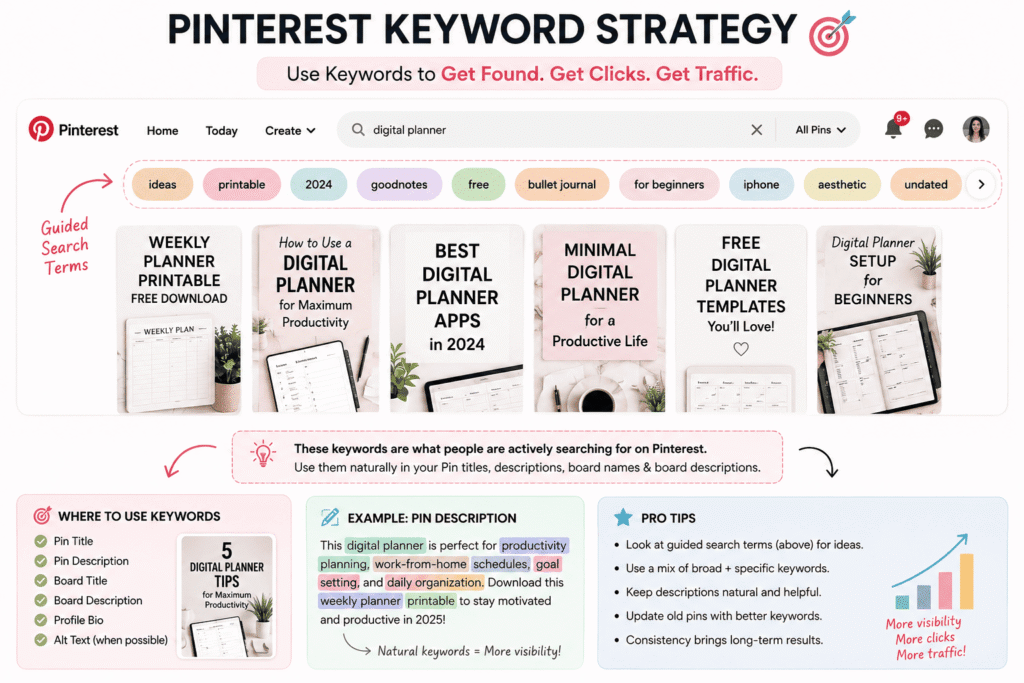
Pinterest SEO is real and it’s surprisingly simple once you understand it. Every pin has a title and a description — and those get indexed just like a blog post. If you treat those fields like an afterthought (“cute planner 🌸”), you’re leaving traffic on the table.
Here’s the approach that worked for me: Go to the Pinterest search bar and type in your main topic. Look at the colored bubbles that appear below the search bar — those are guided search terms Pinterest already knows people use. Stack relevant ones into your pin descriptions naturally. “This weekly digital planner printable is perfect for productivity planning, work-from-home schedules, and goal setting for 2025” covers multiple real searches without feeling forced.
Do the same for your board descriptions. Most people leave them blank. That’s a missed opportunity — your board description is indexed text that can pull searchers right to your profile.
Tools I actually use for this:
Pinterest search bar (free)Pinterest TrendsCanva ProTailwind (scheduler)Pinterest Analytics
Consistency matters — but not in the way you think
You don’t need to post 30 pins a day (that advice is from 2018 and Pinterest has since penalized spam-like behavior). What works now is consistency over time. Somewhere between 5 and 15 pins a day is a reasonable range, and using a scheduler like Tailwind makes this manageable. I batch-create pins on Sunday afternoons and schedule them for the whole week in about 90 minutes.
One thing that surprised me: pinning other people’s content still helps your account. When I mix in quality pins from other creators in my niche, it signals to Pinterest that my profile is an active resource hub, not just a promotional channel. My reach noticeably improved when I started doing this regularly.
Common mistakes to avoid (I made most of these)
- Treating Pinterest like Instagram. Posting without text, focusing on aesthetic over utility, not including a link. Pinterest rewards helpfulness, not beauty alone.
- Pinning everything to one board. Organize content into specific, clearly named boards. A pin about “morning routine tips” shouldn’t live on a generic “lifestyle” board.
- Ignoring the link destination. Your pin can get a thousand saves, but if it links to a slow, confusing landing page, nobody converts. Your site experience matters.
- Expecting overnight results. Pinterest is a slow burn. Most of my best-performing pins didn’t pick up momentum until 3 to 4 months after I posted them. Don’t quit after two weeks.
- Not checking Pinterest Analytics. The data tells you exactly what’s working — which boards drive clicks, which pin styles save best, which topics your audience cares about. Check it monthly at minimum.
Turning Pinterest traffic into actual revenue
Traffic is great, but it’s only useful if it converts. The Pinterest-to-sale funnel I’ve had the most success with is: Pinterest pin → blog post or landing page → email opt-in → sale. Pinterest is almost never a direct checkout driver (unless you’re selling on Etsy or have product pins set up), but it’s an incredible top-of-funnel source.
My most profitable pins link to a free resource — a sample template, a mini guide, a checklist — with an email gate. When someone downloads it, they’re on my list, and that’s where the relationship (and the revenue) actually happens. Pinterest gets them in the door; email closes the deal.
If you’re running an Etsy shop or a product-based business, you’ll want to set up Product Pins specifically. These show real-time pricing and availability and link directly to your product page. The setup takes about 20 minutes and the click quality is noticeably higher than standard pins.
If you have a blog, go back to your top 10 posts right now and create at least 3 pin designs for each one. That’s the single highest-leverage action you can take this week. Old content becomes new traffic when it’s properly pinned.
What nobody tells you about the long game
Six months after I seriously committed to Pinterest, I started getting referral traffic from pins I’d completely forgotten I’d created. That’s the compounding effect people talk about but you don’t truly believe until it happens to you. A well-optimized pin is a tiny asset that keeps working long after you’ve moved on to other things.
I had a pin about “free weekly planner printable” that I made in October and barely thought about — it started ranking in searches the following spring and has sent consistent traffic for over a year now. I made it once. Pinterest keeps delivering.
That’s the real reason to take Pinterest seriously as a business tool: most marketing requires you to keep showing up, keep posting, keep spending. Pinterest rewards good content with sustained reach. For a small business owner or solo creator who doesn’t have a huge team or ad budget, that’s genuinely game-changing.
Start small. Pick one board. Create five pins this week for your best piece of content. Watch what happens over 60 days. The data will show you where to go next — and once you see that first wave of organic traffic arrive from something you made weeks ago, you’ll understand exactly what I mean.