Pinterest Pin Design Ideas can make the difference between getting ignored and getting thousands of clicks.
When I first shared a blog post on Pinterest, I thought, “All I need is a nice image and the clicks will come.”
A month passed.
Zero clicks.
At first, I assumed Pinterest simply didn’t work. The truth was much simpler: I completely misunderstood how Pinterest pin design works.
After studying pins from creators who were getting thousands of saves and repins, I realized something important:
On Pinterest, content matters—but design sells the click.
The good news? You don’t need to be a professional designer. Once you understand a few key principles, everything changes.
In this guide, I’ll share what I learned through six months of trial and error, including what worked, what failed, and the mistakes that cost me the most traffic.
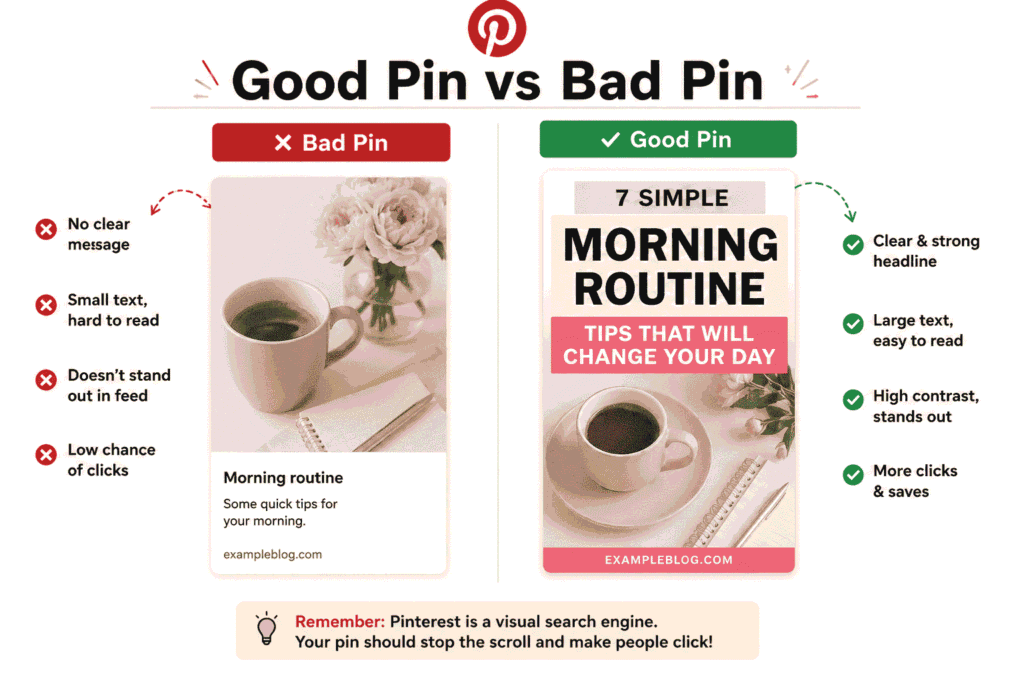
Understand How Pinterest Thinks
Pinterest is not a social media platform.
It’s a visual search engine.
People go there looking for recipes, room ideas, workout plans, outfit inspiration, business tips, and solutions to specific problems.
Your pin has one primary job:
Make people stop scrolling.
Pinterest’s algorithm works the same way. Pins that attract views, saves, and clicks are shown to more users.
That means your first goal isn’t getting clicks.
Your first goal is getting attention.
Pin Size Matters More Than Most People Think
One of my earliest mistakes was creating square images.
The result?
They disappeared in the feed.
Pinterest favors vertical images because they take up more space on the screen and naturally attract more attention.
Recommended Size: 1000 × 1500 pixels (2:3 ratio)
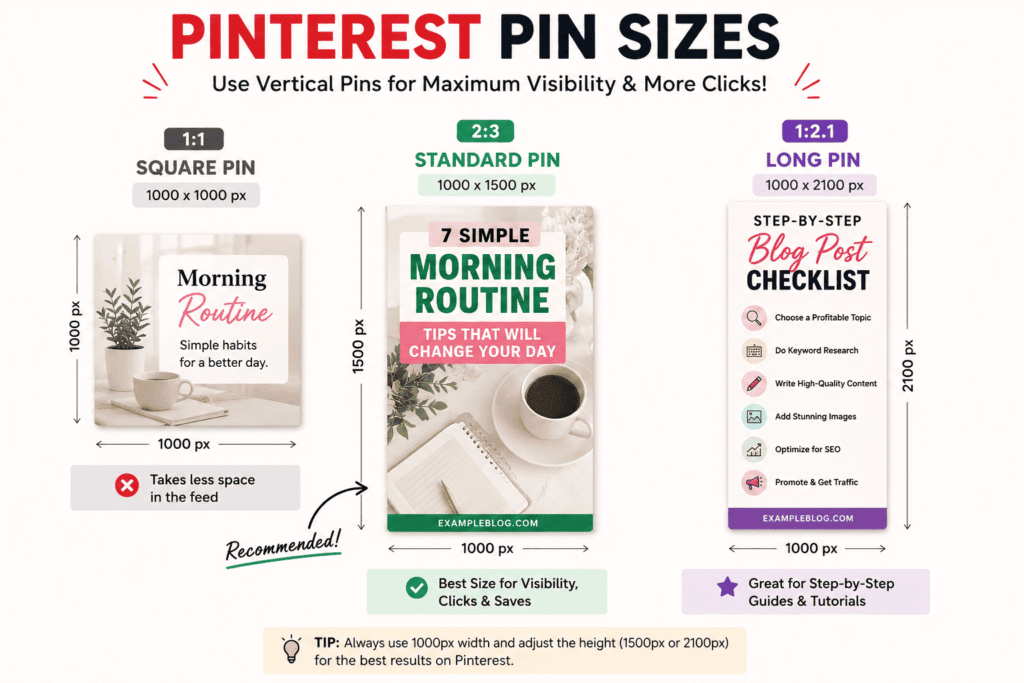
This is Pinterest’s sweet spot and the format I use for nearly every pin.
The good news is that Canva already provides Pinterest templates in this size.
Use Colors That Stand Out
Pinterest has a very clean, light-colored interface.
If your pin uses pale colors or blends into the background, users may scroll right past it.
I noticed a significant improvement in engagement when I started using stronger colors such as:
- Deep Red
- Forest Green
- Terracotta
- Navy Blue
- Warm Orange
A Simple Color Rule
Use:
- One dominant color
- One accent color
- One text color
Too many colors create visual clutter and make your design harder to understand.
The simpler the design, the easier it is to process.
Text On Your Pin Is the Real Hook
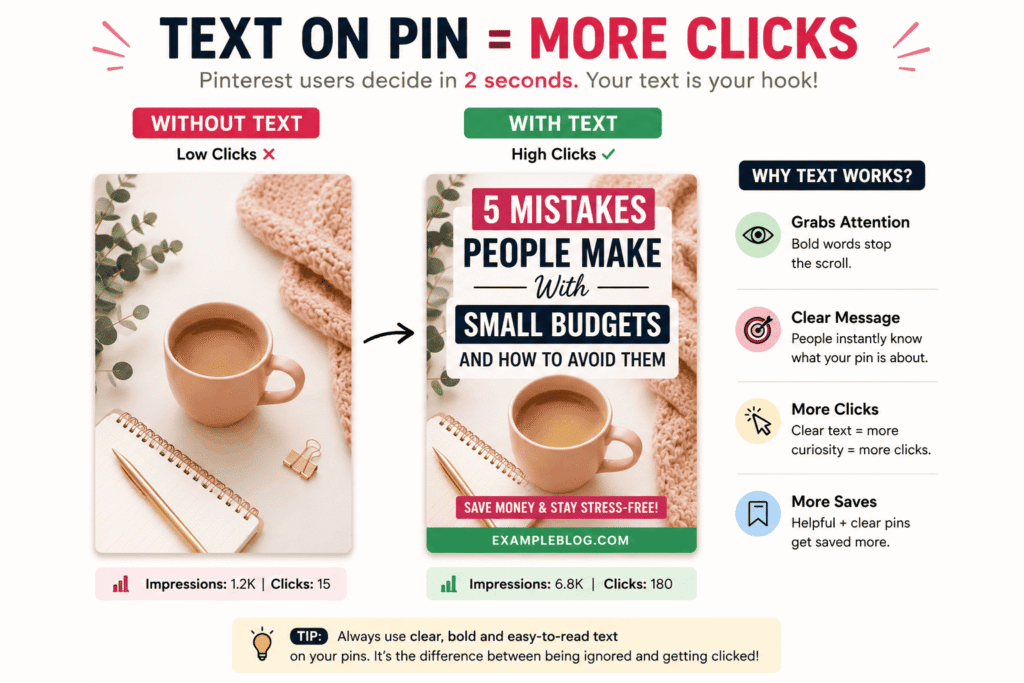
I once created a beautiful pin with great imagery and clean design.
The problem?
There was no text.
The result was disappointing.
Later, I redesigned the exact same pin and added this headline:
“5 Mistakes People Make With Small Budgets”
Within a week, the redesigned version generated three times more traffic.
Pinterest users make decisions incredibly fast.
Most people spend only a couple of seconds deciding whether a pin is worth clicking.
Your text should immediately communicate value.
Text Design Best Practices
- Use large, mobile-friendly fonts
- Stick to two fonts maximum
- Create strong contrast between text and background
- Use curiosity-driven headlines
- Keep important text near the center of the design
Clear text helps users understand what they’ll gain before they click.
Don’t Rely Entirely on Stock Photos
This was one of my biggest mistakes.
For a long time, I used the same stock photos everyone else was using.
The problem is that Pinterest is flooded with identical images.
When I started using original photos—even simple pictures taken with my phone—engagement improved noticeably.
If you must use stock photography:
- Choose less common images
- Crop them differently
- Apply filters or overlays
- Add your own branding
The goal is to make the image feel unique.
Tools I Use Regularly
These are the tools I use most often when creating Pinterest content:
- Canva
- Adobe Express
- Pinterest Analytics
- Tailwind
- Pexels
- Google Fonts
You don’t need expensive software to create high-performing pins.
Most of these tools offer free versions that are more than enough for beginners.
How I Create a High-Click Pinterest Pin
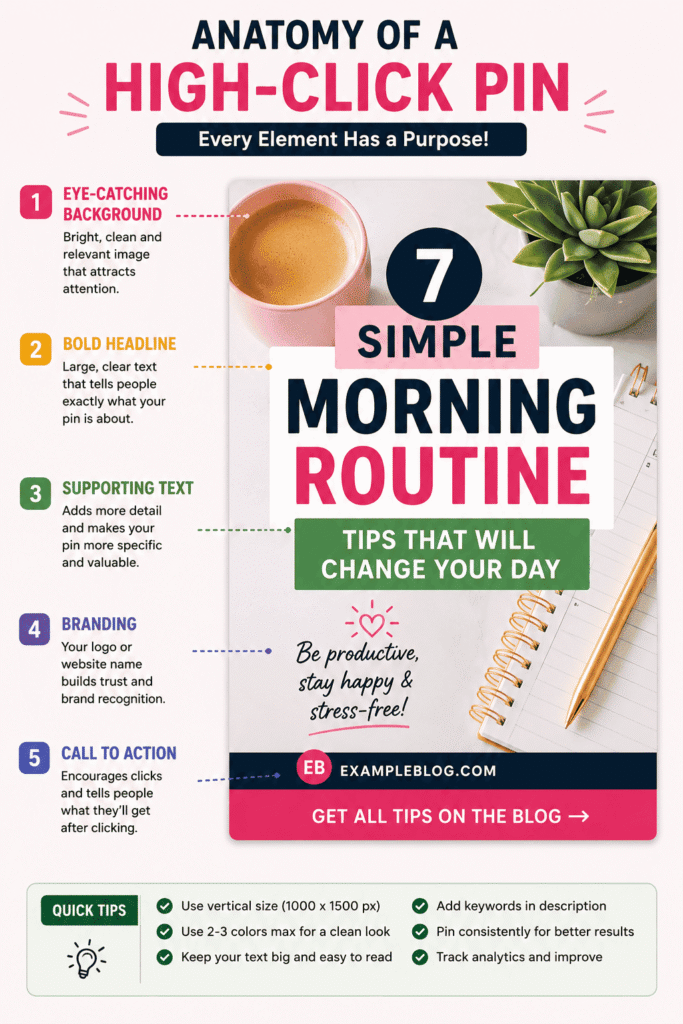
Here’s the process I follow:
- Choose a specific niche or topic.
- Open Canva and select a Pinterest Graphic template.
- Add a background image or solid color.
- Write a strong headline.
- Include a short supporting line.
- Add your logo or website URL.
- Optimize the pin description with keywords.
- Review analytics after 48 hours.
Small improvements compound over time.
Mistakes You Should Avoid
Mistake #1: Using a Different Style for Every Pin
Consistency helps build recognition.
Create a few templates and reuse them.
Mistake #2: Ignoring the Pin Description
Pinterest SEO relies heavily on keywords.
An empty description limits your reach.
Mistake #3: Posting Only Once
Pinterest is a long-term platform.
Many pins take weeks before gaining traction.
Mistake #4: Neglecting the Landing Page
A great pin can generate clicks.
A weak page can lose visitors immediately.
Mistake #5: Ignoring Analytics
Data reveals what your audience actually wants.
Without analytics, you’re simply guessing.
What Actually Works
One trend I’ve seen repeatedly is the success of Idea Pins and Carousel Pins.
Pinterest continues to promote interactive content formats because they keep users engaged longer.
Another strategy that consistently works is seasonal content.
Pinterest users plan ahead.
For example:
- Ramadan content should be published 6–8 weeks early.
- Eid content should be prepared well in advance.
- Back-to-school pins perform best before the season begins.
- Holiday and wedding content benefits from early publishing.
And perhaps the biggest lesson I’ve learned:
Pins with clear text overlays almost always outperform pins without text.
Pinterest Topics That Often Go Viral
Some categories naturally perform well on Pinterest:
- Home Decor Ideas
- Easy Recipes
- Budgeting Tips
- Workout Routines
- DIY Projects
- Outfit Ideas
- Skincare Tips
- Productivity Hacks
- Travel Guides
- Study Techniques
- Parenting Advice
- Small Business Tips
If your content falls into one of these categories, Pinterest can become a powerful traffic source.
My Results
Once I started creating optimized pins using vertical designs, bold headlines, consistent branding, and niche-specific messaging, my Pinterest traffic increased significantly.
In the first month alone, my website traffic from Pinterest grew by approximately 3.5 times.
One recipe pin generated more than 1,200 impressions within two weeks.
Its headline was simple:
“This 10-Minute Breakfast Will Keep You Energized All Week”
That experience taught me an important lesson:
Curiosity + Specificity + Visual Clarity = Clicks
I’ve seen this formula work repeatedly across different niches.
Final Thoughts
Pinterest is a marathon, not a sprint.
Results rarely happen overnight.
Focus on creating better designs, studying your analytics, and improving consistently.
Over time, your best pins can continue generating traffic for months—or even years—after they are published.
And that’s the real magic of Pinterest.